Tuesday, 30 October 2018

The Last Guide to Google Data Studio You’ll Ever Need

As a marketer, data is your lifeblood. To gain support for your new idea or prove the value of your most recent campaign, you need data backing it up. But, for many people working in a primarily creative role, pulling and analyzing data can be a challenging task.

Not only do you have to export your data, which really means opening up a jumbled spreadsheet bursting with an endless amount of metrics, but you also have to configure the data to report it correctly. If you don’t filter out the unnecessary metrics, your data becomes much more difficult to analyze.

Data analysis can be a taxing process, requiring a ton of time and energy. But in an industry that moves as fast as marketing, there’s no time or energy to waste. Fortunately, Google offers a solution to this prevalent problem. 

Their data visualization tool, Google Data Studio, can pull and visualize your data into engaging reports within seconds, saving you countless hours on configuring a bottomless spreadsheet and analyzing a bunch of numbers packed into Excel.

And since Google Data Studio can produce easy-to-understand reports, the tool will help you accurately extract insights from your data and prove that you’re producing results.

With Google Data Studio, you can visualize your data in numerous charts, graphs, and pivot tables, like time series, bar charts, pie charts, tables, heat maps, geo maps, scorecards, scatter charts, bullet charts, and area charts. The tool also lets you customize your reports and dashboards’ logos, images, shapes, background, font, object properties, and more.

If you want to share or collaborate your report or dashboard with someone, you can do it all on Google Marketing Platform. Google Data Studio even has templates to help you quickly and easily set up reports and dashboards.

To learn how to use Google Data Studio, better understand your data, and present it to your team in a more visually appealing way, check out the tutorial below.

Google Data Studio tutorial

1. Login to Google Data Studio.

Just like Google Analytics, Google offers a robust free version of Google Data Studio. To access Google Data Studio, visit datastudio.google.com and sign in with the same account that you use for Google Analytics and Google Search Console.

Google Data Studio is part of Google Marketing Platform, so its interface will look like Google Drive’s interface. Your Data Studio portal will only store your Data Studio documents, which are separated into two categories: reports and data sources.

2. Create a new report.

In the reports section, click the “+” button at the top left or bottom right of the screen. A blank page should appear.

If you want to quickly create a data report from Google Analytics, Search Console, Google Ads, YouTube Analytics, Google Sheets, or Google BigQuery, you can use one of Data Studio’s report templates.

3. Connect your data.

To connect data to your report, click the “Create New Data Source” button at the bottom right corner of the screen. You can connect your report to 18 Google data sources and 98 partner data sources, if you already use a Data Studio partners’ tools.

Once you choose your data source, you need to let Data Studio connect to your Google Analytics account. After that, select your account, property, and view.

Next, a spreadsheet of fields or metrics that your data source tracks will pop up. Press the “Add To Report” button at the top right corner of the screen to connect the data to your report.

4. Customize your report.

Your report will be a blank grid that you can add different types of visualizations to. Before you add your visualizations to your report, though, you can customize its layout and theme.

If you want to add another data source to your report, click the “Resource” button and then press “Manage added data sources”.

Click the “Add a Data Source” button and pick the data source you want to connect to your report.

5. Add a visualization.

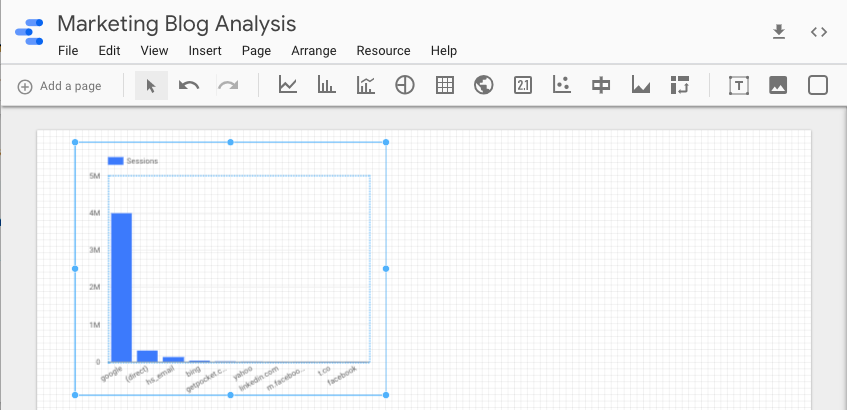
There are a ton of different ways you can visualize data in Data Studio. You can create a time series, bar chart, combo chart, pie chart, table, geo map, scorecard, scatter chart, bullet chart, area chart, and a pivot table. You can also add text, images, and shapes to your report.

Once you choose your visualization, drag its preferred size on your report and release. Your visualization should immediately appear.

Screen Shot 2018-10-29 at 12.38.24 PM

6. Edit your visualization.

In the right sidebar of your report, you can edit your visualization’s data source, dimension, metric, and date range.

You can also sort your data, filter it, add another Google Analytics segment to your visualization, and edit its style.

Additionally, you can turn one visualization of a certain data set into another visualization. For instance, you can change a bar graph into a time series of the same exact data.


Once you finish your first visualization, you can add as many as you want to your report.

Data Analysis Made Easy

Data analysis might be the last task on your to-do list every day, but with Google Data Studio, you can pull and configure your data much faster than you can with Excel. This gives you more time to extract insights from your data, proving your campaign’s results and -- most importantly -- green lighting your next idea.


from Marketing https://blog.hubspot.com/marketing/google-data-studio

25% of People Think All Searches Will Be Done by Voice in the Next 5 Years

Watch any commercial break in full, it seems, and you're almost guaranteed to see an ad for some sort of voice assistant device.

In the past two months alone, Amazon, Facebook, and Google have all announced the release of either new or new versions of their own video smart speakers: voice-assistant-enabled devices that are also equipped with video capabilities. 

29918126_1614973085284262_6329067569776951296_n

Portal, Facebook's video smart speaker

But before the video smart speakers came along, there were the voice assistants themselves: the Siris, Alexas, and Google Assistants of the world that with a touch of a button or a simple vocal command can answer our questions, make phone calls on our behalf, or schedule reminders. 

It's that first task -- answering our questions -- that may have the greatest long term potential. At least 20% of all mobile search queries on Google, for instance, are done by voice: a number that many predict will continue to rise. 

But where do internet users themselves see voice search going -- and how does it align with how they prefer to seek information online today? We decided to find out.

Voice Search Predications: Current and Future Preferences

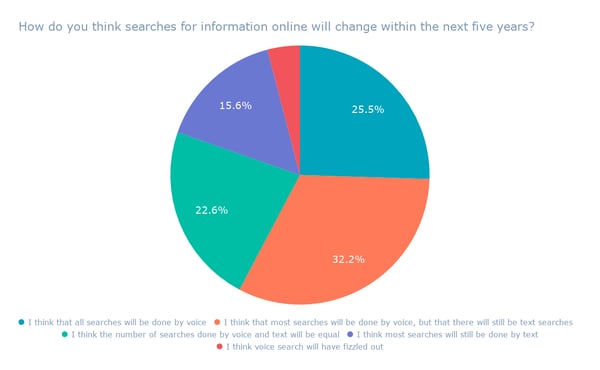
We asked 800 internet users across the U.S., UK, and Canada: How do you think searches for information online will change within the next five years?

How do you think searches for information online will change within the next five years_

About a third of respondents believe that, while most searches will be done by voice, text searches won't be completely eradicated. 

But when it comes to a future where voice search overtakes text completely, about a quarter of respondents identified that as their predictions.

Responses by Region (4)-1

That was especially true among respondents in the U.K., where the highest number of respondents -- 35% -- said that they believe most searches will be performed by voice within the next five years.

That most respondents foresee a future where most searches will be done by voice, but text search will still remain, is reflected in some moves by the companies that build voice assistants.

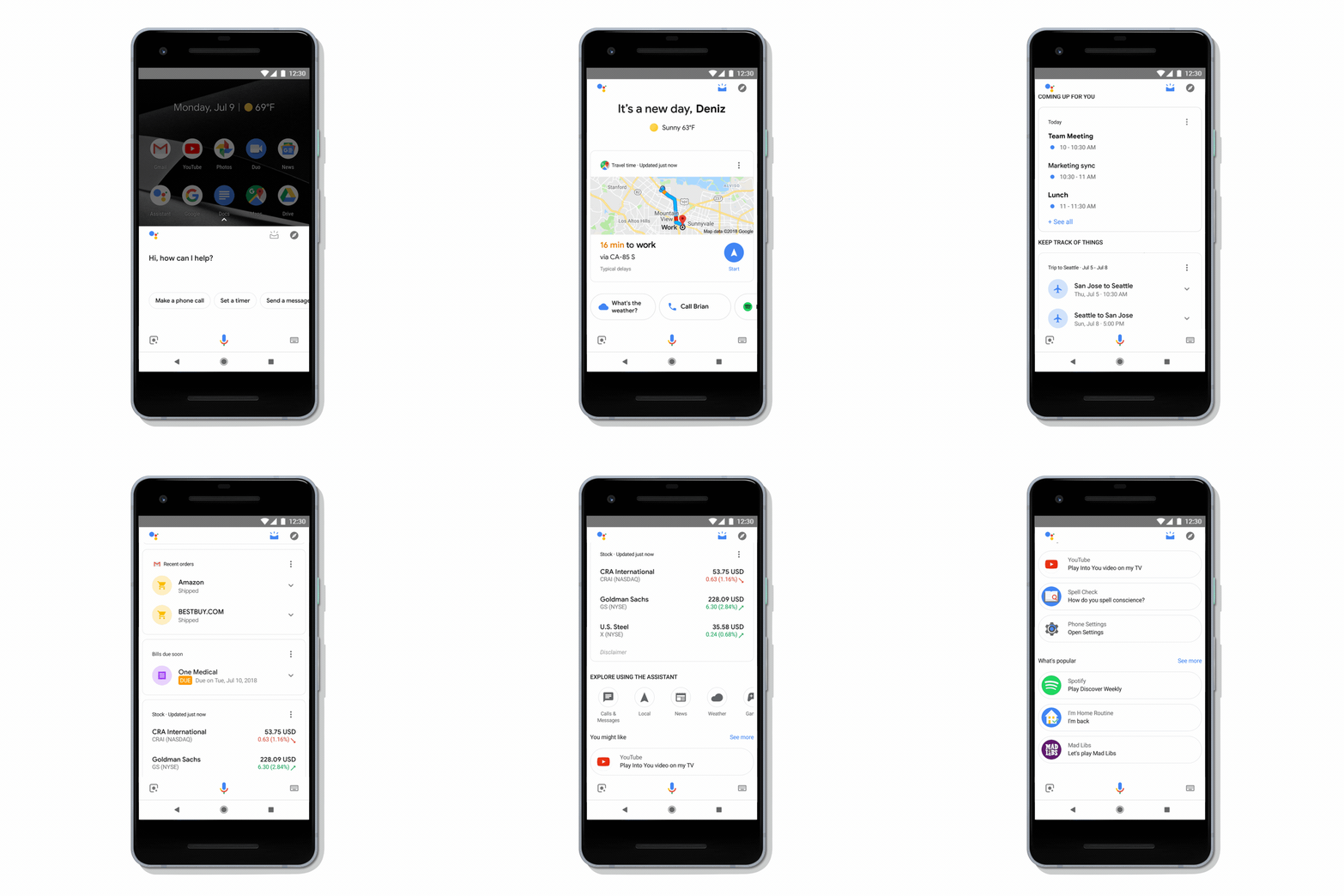
When Google recently revamped its Assistant app, for example, it made it easier for users to enter commands or search queries by voice and touch -- after discovering that nearly half of all interactions with it included both.

Assistant_swipe_up-1

Source: Google

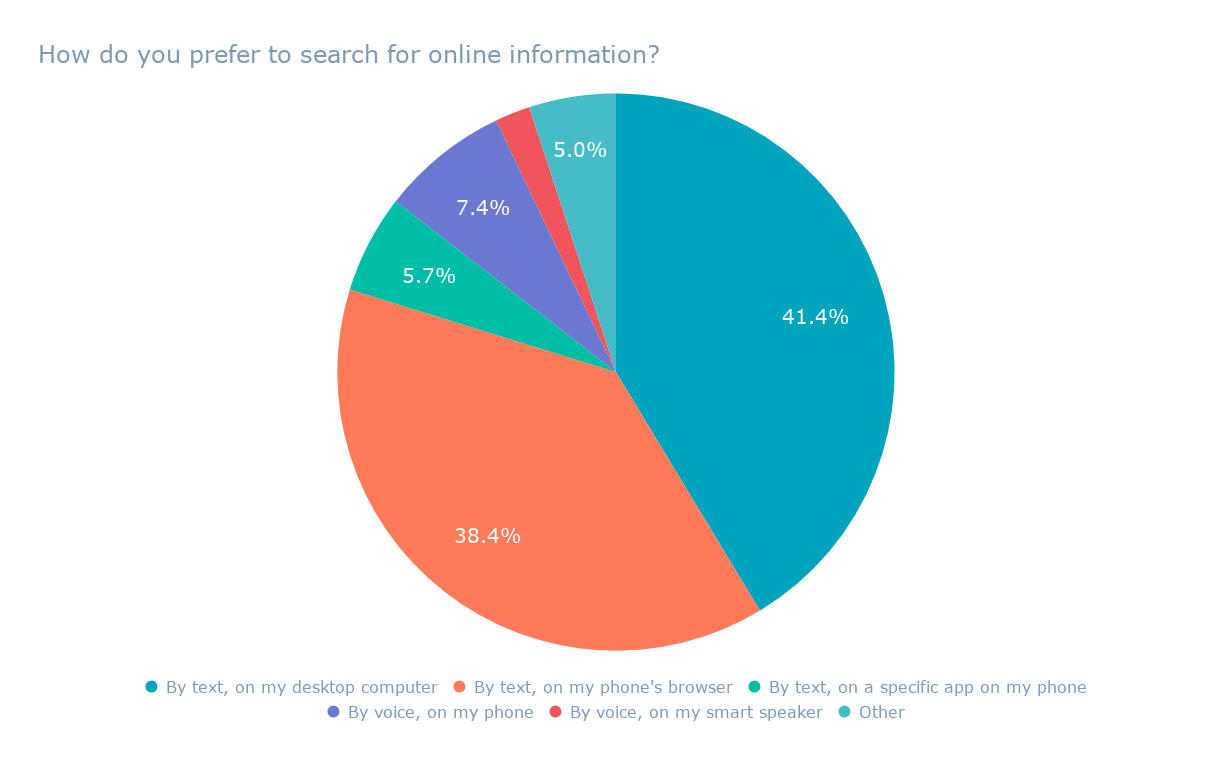
It also aligns with what appear to be current user preferences, which we discovered when we asked another set of 800 internet users across the U.S., UK, and Canada: How do you prefer to search for online information?

How do you prefer to search for online information_

Interestingly, most users still prefer to search by text -- on their desktops -- while a slightly smaller number prefer to search by text on mobile.

If most users still prefer to search by text, how can voice overtake it as the preferred method of seeking information online?

It could be a matter of scale. As automation begins to appear in a growing number of facets in our day-to-day lives -- such as in cars, restaurants, and retail -- consumers will adjust according to the "new normal."

Historically, this phenomenon has repeated itself with many advancements in technology. Just as millions of consumers have acclimated to an increasingly digital world -- with the permeation of things like social media, streaming entertainment, and online video potentially replacing cable -- the trajectory of voice search adoption could follow a similar path.

"I think a lot of consumers are frustrated with poor voice experiences," says Senior SEO Content Strategist Aja Frost. "As the technology gets better, it'll be easier and easier to get the right answer on the first try."

That trajectory may also play out with the growing adoption of voice-equipped devices, such as smart speakers. According to Nielsen, 24% of households reporting having a smart speaker, which is an incremental increase from the previous year.

"As people become more comfortable with voice assistants on their phones ... they'll also become more accustomed to basic voice searches," Frost explains. "It's not a huge transition from, 'How many tablespoons in 1/4 cup?' and 'What's the weather outside?' to, 'What are the best Indian restaurants in X neighborhood?' and 'How do I unclog the dishwasher?'"

As always -- stay tuned.


from Marketing https://blog.hubspot.com/marketing/voice-search-predictions

The 36 Best Instagram Captions for Every Type of Post

If you're anything like me, you take about four minutes choosing a filter for your Instagram photo, and about four hours deciding on a caption.

Worst of all, after much creative effort and advice from friends, I'm usually barely able to write a caption that goes beyond, "Had a fun day with friends!".

And I'm a writer -- go figure.

Next time you're contemplating a caption to go with your Instagram photo, take a look at our complete list of captions for any mood you need to evoke.

Funny Instagram Captions

  1. My favorite exercise is a cross between a lunge and a crunch ... I call it lunch.
  2. I need a six month holiday, twice a year.
  3. I tried to be normal once. Worst two minutes of my life!
  4. Started from the bottom now we're ... still at the bottom.
  5. There are 16 year olds competing at the Olympics and I still push on pull doors.
  6. Namast’ay in bed.
  7. That awkward moment when you're wearing Nike's and you can't do it.
  8. I'm just a girl, standing in front of a salad, asking it to be a cupcake.
  9. What if I told you, you can eat without posting it on Instagram?

Clever Instagram Captions

  1. Patience -- what you have when there are too many witnesses.
  2. Maybe she’s born with it, maybe it’s the Clarendon filter.
  3. It's okay if you disagree with me. I can't force you to be right.
  4. Life is short, false ... it’s the longest thing you do.
  5. There may be no excuse for laziness, but I’m still looking.
  6. You have stolen a pizza my heart.
  7. Seven billions smiles, and yours is my favorite.

Savage Instagram Captions

  1. What's a queen without her king? Historically speaking, more powerful.
  2. Be a little more you, and a lot less them.
  3. I'm an acquired taste. If you don't like me, acquire some taste.
  4. Well behaved people don’t make it into history books.
  5. I'm sunshine mixed with a little hurricane.
  6. I do a thing called what I want.
  7. They say good things take time... that's why I'm always late.
  8. I'm not bossy, I have leadership skills.

Song Lyrics for Instagram Captions

  1. "I’m gonna live like tomorrow doesn't exist." -- Sia, "Chandelier"
  2. "I live for the nights that I can’t remember, with the people that I won’t forget." – Drake, "Show Me a Good Time"
  3. "I hope you never lose your sense of wonder." -- Lee Ann Womack, "I Hope You Dance"
  4. "You may say I’m a dreamer, but I’m not the only one." - John Lennon, "Imagine"
  5. "Feeling good living better." -- Drake, "Over My Dead Body"
  6. "Say oh, got this feeling that you can't fight, like this city is on fire tonight" -- OneRepublic, "Good Life"
  7. "Time makes you bolder" -- Fleetwood Mac, "Landslide"
  8. "If I fail, if I succeed, at least I’ll live as I believe" -- Whitney Houston, "The Greatest Love of All"
  9. "The rest of the world was in black and white, but we were in screaming color." -- Taylor Swift, "Out of the Woods"
  10. "Lightning strikes every time she moves" -- Calvin Harris, "This Is What You Came For"
  11. "We aren't ever getting older" -- Chainsmokers, "Closer"
  12. "Sing with me, sing for the years, sing for the laughter, sing for the tears" -- Aerosmith, "Dream On"


from Marketing https://blog.hubspot.com/marketing/instagram-captions

bigdog launches The Entertainer’s Little Festive Moments for ITV

Integrated advertising and marketing agency bigdog has launched a new campaign for The Entertainer, the fastest growing family-owned high street retailer in the UK.

The Little Festive Moments campaign kicks off with 5’, 10’ and 15’ second idents on ITV’s flagship breakfast programme, This Morning. Running for eight weeks, the creative features a series of little festive moments, each one enabled by products from The Entertainer.

This investment in raising the profile of the toy retailer marks an important shift for the brand, following recent changes to the retail landscape. bigdog, the brand’s lead creative agency, were tasked with helping The Entertainer bring its play-focused positioning to life, highlighting its particular importance during the festive season.

As well as sponsorship of This Morning the idents will also appear as part of the brand’s ongoing CITV sponsorship, as well as being featured on Philip Schofield’s How to Spend It Well at Christmas series, due to air this November. The campaign creative will be run across social and online channels.

The bigdog team was led by Mark Lees on creative, Ross Faulker on planning and Bethan James on account management. Carat handled media buying for the project.

Bethan James, Account Director at bigdog, says: “Obviously we loved having the opportunity to work with the UK’s leading toy retailer on their Christmas campaign. The Little Festive Moments are ones every family can relate to, and we’re hoping they’ll leave This Morning’s viewers feeling appropriately festive!”

Rebecca Naish, Head of Marketing & Licencing at The Entertainer, adds: “The Entertainer exists to provide children and their families with opportunities to play, it’s what our brand is built on and this campaign conveys that intent perfectly. Christmas is such an important family time, and the Little Festive Moments bigdog created for us really captures that.”

The post bigdog launches The Entertainer’s Little Festive Moments for ITV appeared first on TheMarketingblog.


from TheMarketingblog http://www.themarketingblog.co.uk/2018/10/bigdog-launches-the-entertainers-little-festive-moments-for-itv/

Monday, 29 October 2018

The Ultimate Guide to Instagram Hashtags for 2019

Did you know an Instagram post with at least one hashtag averages 12.6% more engagement than a post with no hashtags?

Hashtags are powerful. They can help your posts reach a target audience, attract followers in your niche, increase engagement, and develop a more positive and recognizable brand image.

Here's the thing, though: with great power comes great responsibility (#spiderman).Click here to learn how to use Instagram Stories, Carousels, Influencers, and more. 

Hashtags can skyrocket your business to new heights, but if used too frequently or without a clear strategy in mind, they become pointless and inefficient, e.g.: #happy #superhappy #ecstatic #jumpingforjoy #whatsanothersynonym.

We want your business's Instagram posts to receive optimal engagement, so we've put together an ultimate guide for using Instagram hashtags in 2018. With this guide, you won't just attract followers -- you'll attract the right followers.

Why are hashtags important?

Hashtags are essentially Instagram's sorting process. With around 95 million photos posted on Instagram every day, it's difficult for Instagram to efficiently deliver the right content to the right people. Hashtags help your post get discovered by viewers most interested in seeing it.

Krystal Gillespie, HubSpot's Social Media Community Manager, explains the importance of hashtags this way: "Hashtags are like a funnel. For instance, #marketing is incredibly broad and attracts all types of posts. We've found #digitalmarketing or #marketingmotivation gives us a more specific, targeted reach. The audience searching for these hashtags are also trying to narrow their search to what we offer related to Marketing, so we're actually reaching more of the right people."

Essentially, hashtags are a better way to categorize your posts. They help you reach a target audience, and more importantly, they help your target audience find you. These users are more likely to engage with your post because your post is exactly what they wanted.

Adding one of the most popular Instagram hashtags to your post doesn't necessarily mean you'll see more interaction. Since the hashtags above are so popular, they are being used by millions of people, so your post will most likely be obscured by the competition. Narrowing your hashtag topic is important, but we'll get to that next.

Here are some of the top Instagram hashtags of 2018.

1. #love

Instagram users build their photo galleries on good feelings. For this reason, the #love hashtag is ever present next to the pics of friends, family, vacations, and beautiful scenery.

2. #instagood

Occurrences of this hashtag are inspired by the @instagood Instagram account, which scours the Instagram community for excellent photos and videos that are just too #instagood not to share. Add this hashtag to your content for a chance to be reposted.

3. #me

This is the quintessential selfie hashtag, indicating to the Instagram community that the photo it's captioning is a picture of you.

4. #cute

#Cute puts your content in a pool of Instagram photos and videos that elicit "awes" from all over the Instaverse. If you think your puppy is the cutest puppy that ever lived, it deserves a photo with this esteemed hashtag.

5. #tbt

#Tbt stands for "Throwback Thursday," and encourages Instagram users to post an old photo of themselves or an event they're reminiscing over. Everyone likes content from the good old days -- here's your hashtag for enjoying the nostalgia.

6. #photooftheday

Managing a business account? This hashtag is a surefire way to attract more followers and repeat visitors. If you plan to post daily content, all around a common theme, add the #photooftheday hashtag to increase your exposure.

7. #instamood

#Instamood is all about the vibe or emotion a photo or video elicits. Pretty scenery, a day at the beach, or a night out with good people were all prominent under the #instamood hashtag in 2018. Landscapes are a popular starting point when figuring out what to post on Instagram, according to Jumper Media, and they fit into this hashtag perfectly.

8. #iphonesia

#Iphonesia is dedicated to the burgeoning community of Instagrammers in Indonesia.

9. #food

Meal pics are the bread and butter (no pun intended) of a people-oriented Instagram account -- and 2018 was no exception. Use the #food hashtag to caption your next delicious Instagram photo.

10. #motivation

On Twitter, #MondayMotivation encourages inspiring quotes and messages to help people start the week off on the right foot. On Instagram, the #motivation hashtag has come to caption anything from a photo of a user after a big gym session, to a computer screen right before he or she gets to work.

The above 10 hashtags might have helped define Instagram over the last year, but there are still plenty more that end up trending every year. The following hashtags can help inspire photos and videos that Instagram users always seem to find captivating -- and are sure to in 2019.

1. #life

This one goes out to all the photos and videos that encompass the essence of your life.

2. #travel

Away for the weekend? Show your followers where you are, using this hashtag to indicate you're traveling somewhere new.

3. #fitness

Get in on a trending community of workout warriors with photos and videos from your best exercise sessions, using the #fitness hashtag to share the moment.

4. #repost

Reposting is a common function on Instagram that allows you to share content from other users, with credit back to the original user. Use the hashtag, #repost, to tell others on Instagram that you were inspired by this photo or video.

5. #igers

#Igers is short for "Instagram users." If you've got a photo or video that encompasses the Instagram community, show your solidarity with this colloquial hashtag.

6. #instadaily

This hashtag is similar to #photooftheday -- one of the most popular hashtags of 2018 above this list -- and is perfect for Instagrammers who post every day.

7. #followforfollow

Interested in building a fast list of followers on Instagram? #Followforfollow tells everyone who browses this hashtag that you'll follow users who choose to follow you. This hashtag is always trending highly.

8. #likeforlike

#Likeforlike is similar to the #followforfollow hashtag explained above. Use this hashtag if you want to increase engagement on your Instagram account, telling users that you'll like their photo or video if they like yours.

9. #nofilter

Instagram offers so many different filters to help enhance photos, it's practically assumed that any picture on Instagram has been edited. But if you're posting a pic that was beautiful all by itself, let the world know that this gem didn't need a filter to look so nice.

10. #ootd

#Ootd stands for "Outfit of the Day," a hashtag dedicated to Instagram users who love showing off new clothing and styles on a regular basis.

11. #fashion

#Fashion is a fairly self-explanatory hashtag. Fashion brands and clothing models alike are some of the most prolific users of this hashtag.

12. #fun

If it's not fun, it's not Instagram-worthy. Make it known to millions of Instagram users that you had a blast in your latest photo or video with this popular hashtag.

1. Keep your hashtags organized.

To create an efficient hashtag system, you can use Excel or an Instagram analytics tool. If you choose an excel sheet, you'll need to manually keep track of which hashtags you use, how often, and which ones correlate to your most popular posts. Over time, you'll see relationships between certain hashtags and your most popular posts, and this can help you decide which hashtags work best for your brand.

If you have a more advanced social media team, you might want to consider a tool like Iconosquare, which automatically stores top hashtags and provides reports on which hashtags reach the most people.

For smaller businesses with limited budgets, Krystal Gillespie says that, "an excel sheet is the best way to start. Once you get more advanced I would highly recommend using a tool to track the data. A manual system can get overwhelming when you're posting three times a day and using about 20 hashtags per post."

2. Figure out your magic number.

Most top brands -- 91% of them, to be exact -- use seven or fewer hashtags per post, so it's easy to assume that's the magic number for everyone … right? Krystal explains that this isn't always the case: She told me HubSpot has been more successful with hashtags ranging in the low 20s.

The point is, you can't know how many hashtags work best for you until you test it. For HubSpot, it took the team several months to find a number that worked best, and during our trial period, we ranged from seven to 30. Give yourself the same flexibility for trial and error.

3. Narrow your hashtags.

There are two big reasons more specific, smaller-volume hashtags are better for your brand: first, you can compete in a smaller pool. HubSpot, for example, doesn't typically use the hashtag #marketing because it's too broad. If you search #marketing, you'll find pictures of restaurants, inspirational quotes, before-and-after hair style pictures, and memes.

The randomness of #marketing leads me to the second reason specific hashtags are a good idea: as a user, I'm more likely to find what I need if I search for something specific, and when your business comes up for my specific search request, I'm more likely to be happy with what I found.

Krystal explains: "Keeping a hashtag close to the interests of your brand really helps. We try to use hashtags tailored for a specific topic and then narrow it down further -- for instance, we'd use #SEOTips if our marketing post was mostly about SEO."

Think of it this way: #dogs is more popular, but it has a wide demographic. If I search #goldenretrieverpuppies and I find your post, I'm more likely to engage with it because it's exactly what I wanted.

4. Research what other people are hashtagging.

An easy way to generate hashtag ideas is to make a list of your followers or competitors and research what they're hashtagging on their own photos. It can also be particularly helpful to research what influencers in your industry are hashtagging -- by definition, influencers are people with a large social media following, so they must be doing something right.

5. Test out related hashtags.

When you type a hashtag into Instagram's search bar, Instagram shows you related hashtags in the scroll-down menu. Instagram also delivers related hashtags on the next page after you click on a hashtag. This is a simple way to create a longer list of hashtags to try out.

6. Follow your own hashtag.

Another way to use Instagram hashtags for your marketing purposes is to follow your own hashtag. Krystal explains, "On Instagram I actually follow the hashtag #hubspot so I can find anyone who talks about us and connect with them. As long as your account isn't private, people will be able to find you via the hashtag."

Following your own hashtag is an effective way to engage with other people talking about your brand and develop better relationships with them.

7. Create a brand campaign hashtag.

This is the trickiest item on the list, but if done successfully, it can pay off big time. Some businesses have successfully attracted followers by creating their own campaign hashtag. A campaign hashtag needs to be funny, clever, or at least memorable in order to work.

Campaign hashtags are particularly useful for promoting a new product or upcoming event, or even just inspiring people. Red Bull, for example, encouraged followers to post Red Bull pictures with a #putacanonit hashtag (see what I mean about clever?). LuLuLemon, rather than running a more traditional ad campaign, developed a positive connotation for their brand by asking followers to post real, active pictures of themselves with a #sweatlife hashtag.

Now that we've covered the importance of using Instagram hashtags for your business, you might be wondering how to search for Instagram hashtags within the app, or how to use the search function to find related ideas. If you're unsure of the technical process for hashtag searching, here's how:

1. Open Instagram and tap the search icon.

Instagram wants you to use hashtags, and has made it extremely easy to find the perfect ones for your post. To start, open the Instagram app on your mobile device and tap the magnifying glass at the bottom of your screen.
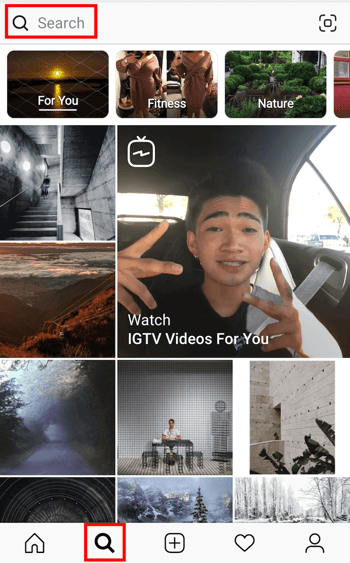
Instagram home screen with magnifying glass icon and search bar highlighted in red

2. Tap the search bar at the top of your screen.

The search screen on your Instagram might first send you to a newsfeed-style page with suggested content based on topics you've demonstrated an interest in on social media. To switch to a hashtag search, tap the search bar at the top of this page, as shown in the screenshot above.

3. Tap "Tags."

Once you've tapped the search bar at the top of your screen, Instagram will give you four options with which to filter your search. Instagram refers to hashtags as simply "Tags," as shown in the screenshot below. Tap this "Tags" option, then tap the search bar above it, and begin searching topics for which you want to find a trending hashtag.

You don't have to include the pound sign (#) in your search -- your results will be the same with or without it -- but you will need to use this pound sign in the caption of your photo once you choose a hashtag.
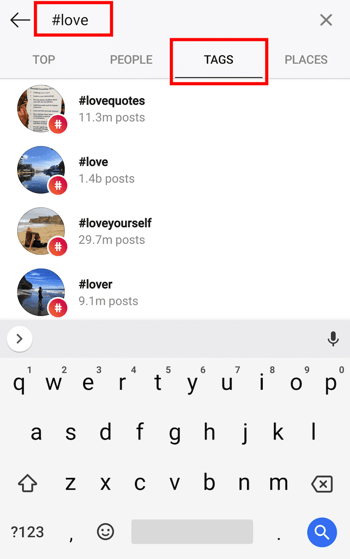
Search page where you can search hashtags on Instagram

4. Browse hashtags based on post count and current content.

Voila! You should see multiple options for hashtags based on your search. Browse around at each related hashtag that Instagram suggests for you -- you might find that a hashtag with slightly fewer posts includes photos or videos that are more in line with the content you're posting.

Happy hashtagging!
Instagram for Business

https://offers.hubspot.com/instagram-for-business-in-2018?hubs_post-cta=slide


from Marketing https://blog.hubspot.com/marketing/instagram-hashtags

Download this new eBook : The essential guide to content personalization

This eBook has everything you need to know about content personalization – starting with the challenge: there’s way more content than quality online real estate.

Fill out the form to download the Essential Guide to Content Personalization!

It includes:

  • An overview of Content Personalization
  • Facts: numbers, data and more good stuff
  • The science that drives online performance
  • A “How to Get Started” guide

Just fill out the form on this page to download the Essential Guide to Content Personalization!

The post Download this new eBook : The essential guide to content personalization appeared first on TheMarketingblog.


from TheMarketingblog http://www.themarketingblog.co.uk/2018/10/new-ebook-the-essential-guide-to-content-personalization/

In a Land of Automated Milk and Honey, Marketers Are Presented With an Opportunity

If I remember correctly, I was about 12 years old when I met my first robot.

At that time, robots were a novel concept rarely seen anywhere beyond a science fiction movie or TV show. This wasn't just any robot. It didn't sound like a series of beeps and boops, nor did it speak in monotone. It conversed with me like any human would, asking me about what I had for lunch and complimenting my earrings.

Little did I know that this somewhat primitive human-robot interaction would set into motion a series of events that would bring me back to California, time and time again, for many more interactions with machine-taught, artificially intelligent beings and gadgets.

It would also progress the age-old debate that comes with advancements in technology: At what point does the benefit of technological advancement become mitigated by humans having their jobs replaced by machines?

After spending a few days in San Francisco engaging with an array of automated concepts -- markets, coffee shops, and restaurants -- here's some of what I learned.

A Land of Automated Milk and Honey

A Birds-Eye View of Income in San Francisco

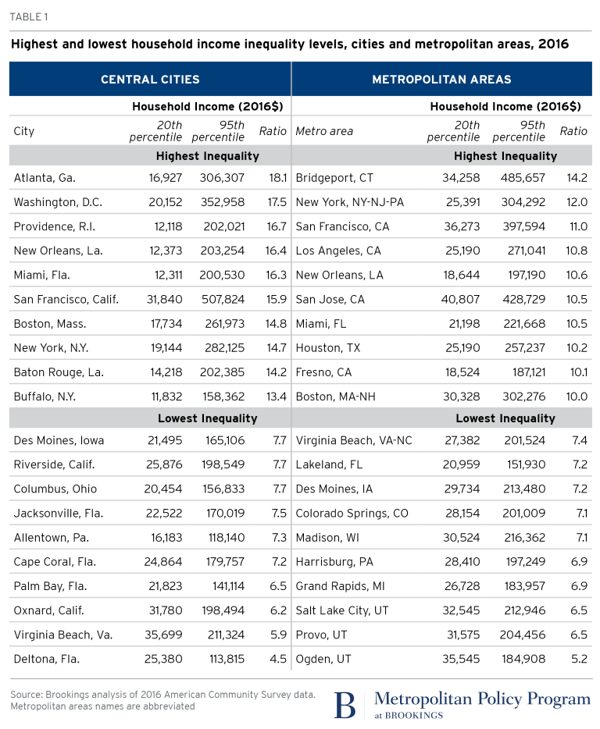
According to a study conducted by the Brookings Institute, San Francisco has the sixth-highest household income inequality in the U.S., with some of the wealthiest households earning over 15X as much as some of the lowest-income ones.

2018-02-05_metro_table_metrocities-income-inequality-1-1

Source: Brookings Institute

The tech sector -- which is highly concentrated in San Francisco and the surrounding Silicon Valley area -- is often blamed for this income disparity. It's said by some to generate wealth for those who reach some of the higher ranks of these companies, to “prodigious” heights that create a rapidly growing moat between tech's high earners and, well, everyone else.

"Prodigious" is a word used by Russell Hancock, president of nonprofit Joint Venture Silicon Valley, in a 2014 interview with MIT Technology Review. “But when we used to have booms in the tech sector, it would lift all boats," he added at the time. "That’s not how it works anymore. And suddenly you’re seeing a backlash and people are upset.”

IMG_3777

A worker strike in San Francisco

An Increasingly Cashierless World

The growth of the tech industry leaves some wondering if it advancements bleed into the aforementioned disparity. Last week, for instance, I wrote about the experience of visiting an Amazon Go store in San Francisco: the fifth location opening of the ecommerce giant's famously cashierless stores.

And while the experience was one that I might describe as "neat," it got me wondering about the repercussions of an increasingly cashierless society.

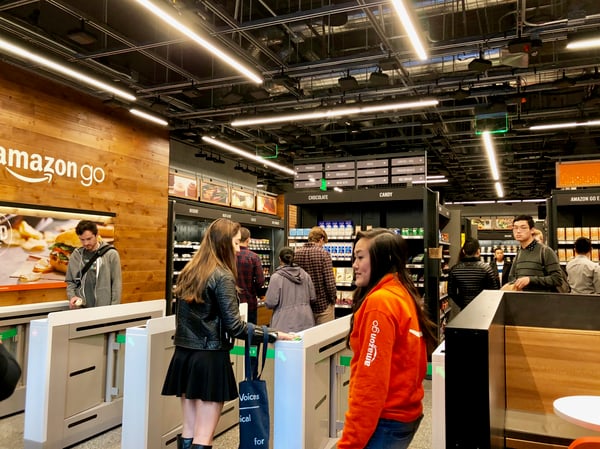
IMG_3728

The latest Amazon Go store in San Francisco, California

The Amazon Go store is far from the only cashierless retail experience in San Francisco. In the span of only a few days, I visited not only this particular store, but also, a cashierless restaurant and a self-described robotic coffee bar.

Consider that the role of cashier is filled by 3.5 million Americans. In an increasingly automated world, what becomes of them -- and what should we do now to prepare for it?

A robot serves my coffee order, after preparing it without human intervention

Automation (And Growth) for All

The replacement of humans by machines is not a new concept. Similar phenomenons played out when the assembly line was created, when horse-drawn carriages were outpaced by the automobile, and when air travel became more convenient than traveling by railroad or sea.

Many argue that automation creates more new jobs than it does eliminate them, which poses the question: How can automation be built and approached in a way that actually benefits everyone involved?

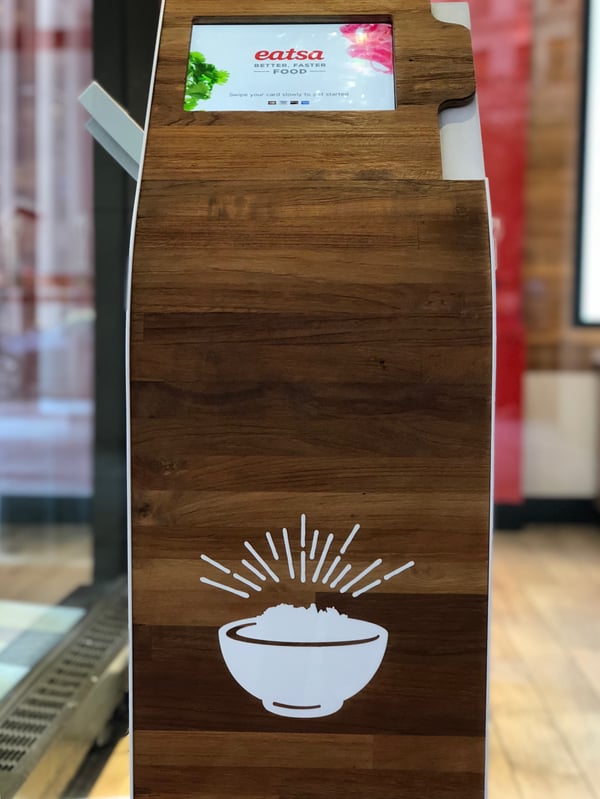
IMG_3864

An ordering kiosk at eatsa, one of San Francisco's automated restaurants

"The transition [to automation] needs the right education and training to enable people to take advantage of the new opportunities," says HubSpot CMO Kipp Bodnar. "We should be invest more now in that training and education for innovations like automation, which we know is only going to grow."

And while an investment in this education and training is a worthy one, many are left wondering who's going to fund it -- in a way that builds automation in a positive manner, helping users, businesses, and employees alike grow.

IMG_3854 A robot barista at San Francisco's CafeX

The answer, Bodnar says, could also exist in "a partnership": between the private and public sector, and between businesses.

Consider small-to-midsize businesses (SMBs), for instance which often "operate at a local level," says HubSpot VP of Marketing Jon Dick. Addressing automation in a constructive, growth-oriented way creates possibilities for such businesses to invest in education and training on a community level.

And where SMBs budgets are small, larger vendors with whom they work might play a role, Dick says. "You could imagine large tech companies distributing funding through customers or partners."

In other words, the investment in building better automation in a way that helps everyone grow -- which includes having a stake in the early education and training to fill the roles it create -- doesn't have to be a foreboding one.

Rather, it leads to a crucial moment for companies to work with together. This collaboration has a ripple effect -- not just for building better technology and growth opportunities for all, but for how else these partnerships between businesses could strategically evolve over time (for example, in the area of co-marketing or co-branding for future initiatives).

At the end of the day, "This is an ethical issue," says Bodnar -- one "that can have significant impact on the brands who choose to hold themselves to a high ethical standard."


from Marketing https://blog.hubspot.com/marketing/automation-tech-and-markters-dilemma