Tuesday, 29 May 2018

Fixed Cost: What It Is & How to Calculate It

"Business is personal -- it's the most personal thing in the world."

These are famous words by Michael Scott from the TV show, The Office. And although this quote conflicts with the universal belief that business isn't personal, Michael's point of view is perfect when learning about a business's fixed costs -- or those costs that don't change as a company grows or shrinks.

To identify and calculate your business's fixed costs, let's start by looking at the ones you're already paying in your personal life. Then, we'll explain how a business manages its own fixed costs and review some common fixed cost examples.

What Is a Fixed Cost?

Fixed costs are those costs to a business that stay the same regardless of how the business is performing. These costs are known as fixed costs to distinguish them from variable costs, which do change as the company sells more or less of its product.

Consider your personal routine. As a single adult, your expenses would normally include a monthly rent or mortgage, utility bill, car payment, healthcare, commuting costs, and groceries. If you have children, this can increase variable costs like groceries, gas expenses, and healthcare.

While your variable costs increase after starting a family, your mortgage payment, utility bill, commuting costs, and car payment don't change for as long as you're in the same home and car. These expenses are your fixed costs because you pay the same amount no matter what changes you make to your personal routine.

In keeping with this concept, let's say a startup ecommerce business pays for warehouse space to manage its inventory, and 10 customer service employees to manage order inquiries. It suddenly signs a customer for a recurring order that requires another five paid customer service reps. While the startup's payroll expenses go up, the fixed cost of a warehouse stays the same.

Average Fixed Cost

Keep in mind you have to keep track of your business's fixed costs differently than you would your own. This is where average fixed cost comes into play.

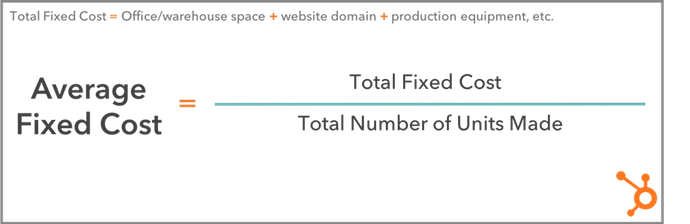
Average fixed costs are the total fixed costs paid by a company, divided by the number of units of product the company is currently making. This tells you your fixed cost per unit, giving you a sense of how much the business is guaranteed to pay each time it produces a unit of your product -- before factoring in the variable costs to actually produce it.

Average fixed cost formula

Let's revisit the ecommerce startup example from earlier. Assume this business pays $5,000 per month for the warehouse space needed to manage its inventory, and leases two forklifts for $800 a month each. And last month, they developed 50 units of product.

The warehouse and forklift costs remain unchanged regardless of how many products they sell, giving them a total fixed cost (TFC) of $5,000 + ($800 x 2), or $6,600. By dividing its TFC by 50 -- the number of units the business produced last month -- the company can see its average fixed cost per unit of product. This would be $6,600 ÷ 50, or $132 per unit.

Fixed Cost Examples

So far, we've identified a handful of fixed cost examples since considering the costs we already pay as individuals. A home mortgage is to a lease on warehouse space, as a car payment is to a lease on a forklift.

But there are a number of fixed costs your business might incur that you rarely pay in your personal life. In fact, some variable costs to individuals are fixed costs to businesses. Here's a master list of fixed costs for any developing company to keep in mind:

  • Lease on office space: As long as your business operates in the same building, your rent cost doesn't change.
  • Utility bills: Your heating or cooling bill might fluctuate as seasons change, but it is generally not affected by business operations.
  • Website hosting costs: When you register your website domain, you pay a small monthly cost that remains static despite the business you perform on that website.
  • Ecommerce hosting platforms: Ecommerce platforms integrate with your website so you can conduct transactions with customers. They typically charge a low fixed cost per month.
  • Lease on warehouse space: Warehouses are paid for the same way you'd pay rent on your office space. They do not change in price as you store more or fewer products inside, but can have storage and capacity limits.
  • Manufacturing equipment: The equipment you need to produce your product is yours once you buy it, but it will depreciate over its useful lifetime. Depreciation can become a fixed cost if you know when you'll have to replace your equipment each year.
  • Lease on trucks for shipment: Truck leases work the same way as a car payment, and will not charge differently depending on how many shipments you make.
  • Small business loans: If you're financing a new business with a bank loan, your loan payments won't change with your business's performance. They are fixed for as long as you have a balance to pay on that loan.
  • Property tax: Your office space's building manager might charge you property tax, a fixed cost for as long as your business is on the property.
  • Health insurance: Health insurance costs might be a variable cost to an individual if they add or remove dependents from their policy, but to a business, the recurring costs to an insurer are fixed.

Calculating your fixed costs isn't always the most fun part of growing your business. But knowing what they are, and when you'll pay each one, gives you the peace of mind you need to serve and delight your customers.


from Marketing https://blog.hubspot.com/marketing/fixed-cost

8 Strategies to Embrace the Future of Content Marketing

93% of B2B businesses use content marketing.

Only 5% feel that their efforts are very effective.

And an estimated 50% of all content is going completely unused.

Where did it all go wrong?

Just a few years ago, you could post 1, 2, 3, 300 blog posts on your website; furiously direct traffic to them through all your social platforms; amass zillions of inbound links; target a bunch of keywords; aaand easily rank on Google.

Controlling your message and gaining customers was (well, almost) a piece of cake.

No longer.

The halcyon years are over; as Gartner’s Hype Cycle predicted, we’re knee-deep in the trough of disillusionment.

null

Like the overhyped marketing channels that came before (TV spots, billboards, banner ads) content marketing peaked — then slumped.

After the huge success of a few early adopters, more and more people joined the party until the novelty disintegrated.

Resistance has built, but expectations haven’t faded — from marketers, at least. And the tighter they cling on, the less effective content marketing becomes.

So where do we go from here?

Quitting isn’t an option. Content marketing can’t be consigned to the past like those other clearly-defined tactics, because the boundaries around it are so fluid.

If content marketing is simply the strategic distribution of valuable content, then it encompasses almost all of marketing today.

And it can be as powerful as it once was.

But first, we need to understand the recent changes it has undergone, the barriers that stand in our way, and how to overcome them.

We don’t have to bin the playbook — we can rewrite it.

Here’s how.

Less is more

This one’s a no-brainer: we’re drowning in content.

Brands are generating more than ever, with one study counting a 300% increase this year compared to last.

The problem? Consumer demand for it remains static.

There’s only so much we can consume, process and share.

We still appreciate great content to the same extent, but as saturation increases, the big results are going to a proportionally smaller number of pieces.
But that’s not all.

Further analysis shows that 5% of branded content garners 90% of total consumer engagement.

null

And a quick search of ‘content marketing law’ confirms this is the case more or less across the board: on average, 19 out of 20 pieces gets little to no attention.
Or, if a team produced 90% less content, they would still achieve the same results.

The solution is simple. Publish less. Publish well. Publish only when you have something valuable to say.

Then, devote freed-up resources to optimizing the evergreen content you already have.

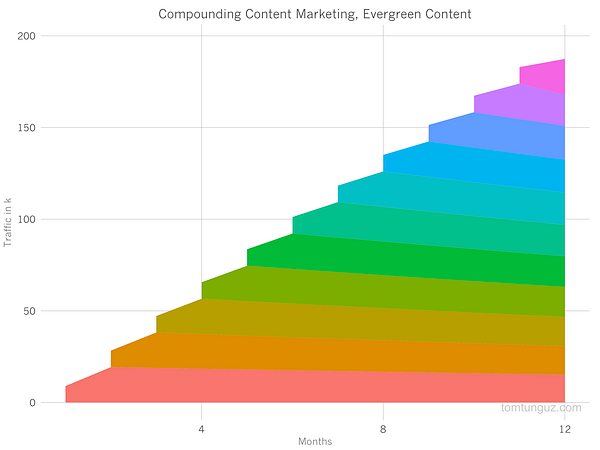
Evergreen Content

  • ‘Evergreen’ content is simply content that doesn’t lose its value over time; it has no sell-by-date.
  • ‘Temporal’ content only has short-term relevance.

Both have their place. Temporal content keeps things fresh and buzzy with short spikes of interest. But it’s evergreen content that generates those lovely compound returns that make content marketing valuable in the first place.

null


null


It can be tempting to try and keep up with our fast-paced online life by churning out a constant deluge of temporal content. But relying on those little bursts of interest is a) expensive, b) time-consuming and c) unsustainable — to the point of diminishing returns.

Even if a post gets a lot of initial buzz, studies show that shares don’t equal links.

null

Evergreen content, on the other hand, has consistently been proven to drive the biggest amount of organic traffic for the minimum amount of effort.

This isn’t an either/or; but the scales should be tipped highly in favor of evergreen over temporal.

However, evergreen content needs to be watered regularly to stay healthy. Enter historical optimization.

Historical Optimization

Historical optimization is the practice of refreshing ‘old’ (i.e. not published today) content to increase lead generation and traffic.
It helps with:

  • content with high conversions but low traffic;
  • content with high traffic but low conversions;
  • and content that is underperforming relative to the time and resources it took to create.
null

By employing historical optimization, you capitalize on the existing authority and traffic a post already has.

Content should be updated to improve accuracy, freshness and comprehensiveness.

Useful areas to tweak? Titles, the quality of the copy, internal and external links, images, meta-description and CTA.

You can also ask GrowthBot for the keywords you rank for and compare them to keywords similar organizations are ranking for.

Then, content can be resurfaced as brand new (with a publication date to match — Google favors fresh content).

Distribution and Resurfacing

The distribution of content is almost as important as the content itself.
And by dedicating efforts to resurfacing existing content, you can reach the same (or a larger) audience with less effort, as well as reducing pressure on staff to keep churning out new stuff.

It’s a tactic that’s helped online publications like The Atlantic (where more than 50% of monthly traffic comes from content not produced that month) significantly raise their readership.

Resurfacing can include everything from evergreen hits, newly refurbished stories, temporal content that has found renewed relevance; or simply nuggets of information or research that continue to be useful.

It all boils down to the oft-cited definition of content marketing success: helping the right audience find the right content at the right time.

By staying abreast of the current content climate, you can evaluate if a story is worth resurfacing (or writing) in the first place; and if so, how best to distribute it.

But this relies on more than an educated guess. Smart automations like GrowthBot can help clarify what’s of interest to your target audience. Try asking it what stories are trending for a certain topic, or which posts are the most-viewed on a relevant site.

Another great way to find popular content on any topic is with Ahrefs’ Content Explorer.

Smarter SEO

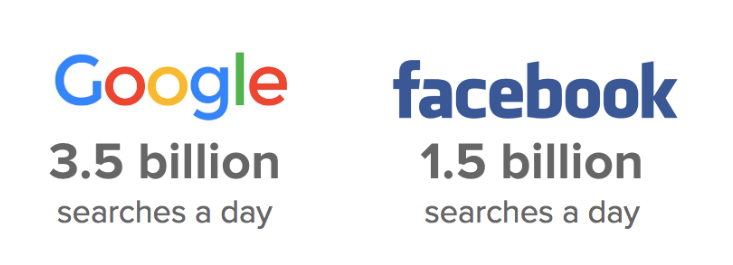
Today, the top distribution channels are controlled by a small number of huge companies: specifically, Alphabet and Facebook (and everyone they own, including Google and Youtube).

null

So, we’re essentially at the mercy of their algorithms — which are subject to constant change, including:

  • Google’s algorithm being updated to favor ‘real experts’ on a topic (not content machines or college kids copywriting to pay their tuition fee).
  • Search engines in general (including technology like Amazon Alexa) becoming more complex and sophisticated — they’re now able to understand semantically-related concepts.
  • Personalized search making keyword rankings unpredictable and harder to calculate.
  • Google displaying featured snippets on the SERP (search engine results page).
  • Facebook updating their organic reach News Feed content with the same intent: to keep users from navigating to different sites.

These changes represent a shift in the classic function of SEO.
Obviously, the first step is to ensure your content is sufficiently engaging and educational not only to rank high in search results, but to entice readers away from the SERP.

However, that’s no longer enough.

Build Around Topics

To assert yourself as a ‘true expert’, you need to create accurately and consistently around a certain topic — not one-off content to target certain keywords.

Topic clusters have been lauded as the future of SEO and content strategy, but are widely underreported on (so now’s the time to strike!) A topic cluster is simply a group of interlinked web pages built around one ‘pillar’ page.

null

The pillar page and cluster pages link back to each other via the use of the same hyperlinked keyword.

When one of these pages performs well, the entire topic gets a rankings boost, leading to more visitors and a positive feedback loop traffic and conversions.

This will also improve search ranking of similar content on your site, which can even lead to you owning multiple SERP positions for a certain keyword.

Implementing topic clusters will clarify a site’s organization and architecture. It also encourages a more deliberate approach to posting.

In the past, a team would generally post for the sake of interest or topicality. With topic clusters, they can use organic gaps in an existing cluster as a strategic starting point.

Featured Snippets

Featured snippets are the high-ranking search results featured in a box below the ads on Google. In a nutshell, they’re there to answer a user’s question straightaway.
Being featured, unsurprisingly, results in tons more exposure: RKG Merkle’s Ben Goodsell noted an 677% increase in revenue from organic visitors and a 400% increase in click-throughs.

null

Ahrefs reports that 99.58% of featured pages already rank in top 10 of Google, so if you’re already ranking high your chances are promising.
But, as outlined in this awesome Moz guide, there are plenty of ways to optimize your content to increase its chances of getting featured, including: keyword research, on-page SEO, Twitter monitoring, structure, formatting and imagery.

It’s also important to try and answer as many similar questions possible.
You can also look for relevant existing snippets already owned by another company and try to get a mention.

null

Another handy feature is the ‘people also ask’ widget, which gives an insight into what Google links together. By exploring this, you can sniff out untapped content opportunities and strategize for the future.

Facebook

By combining PPC with recommendation algorithms, Facebook has flippedthe digital advertising value chain upside down.

As outlined in Buffer’s report, Facebook’s new algorithm relies on three active interactions: commenting, sharing and reacting.

null

Adam Mosseri, Head of News Feed, explains: “Page posts that generate conversation between people will show higher in News Feed.”

But a no-go for brands is posting content that ‘baits’ customers into commenting, sharing or reacting; this will result in demotion of your content on newsfeeds.
The engagements need to be based on genuine interest, not just consumption.

null

The algorithm also places equal emphasis on posts that have been shared privately as well as publicly.

For most brands, reach and referral traffic from Facebook will continue to decrease; so it may be worth re-evaluating investment and resources dedicated to Facebook.
There’s no silver bullet — content needs to authentic, meaningful (and usually emotionally driven) to succeed.

Buffer’s Brian Peters summarizes: “Instead of creating content, for your brand, that people interact with, we need to start creating content, for the people, that will spark enough emotion to generate a comment or share.”

Breaking Out of Our Rut

The final barrier is our dependence on the same, worn-out methods; a strategy that worked in the past won’t necessarily continue to work.

That’s why it’s important to keep experimenting, testing and iterating with different channels and acquisition tactics.

This will help you build up a portfolio of experience to fall back on if your core strategy starts losing traction or just isn’t working.

It’s also useful in terms of tapping into new audiences or digging deeper into your target audience’s interests.

Here are some methods to try.

Conversational Marketing

Conversational marketing means having a real-time, one-to-one conversationwith a customer or lead.

According to a recent study, 90% of consumers want to use messaging to communicate with businesses. Platforms like Drift and Intercom make scaling these conversations possible.

This signals a change in the way content marketing is distributed, making the prospect of customers receiving the right content at the right time — i.e, when they’ve just asked you for it — a reality.

Alex De Simone, CEO of Avochato explains: “Machine learning technologies that enable marketers to tailor who sees a message are starting to decide what the content of conversations should be. The shift from traditional content marketing to machine-mediated conversational marketing will change the way marketers operate, empowering them to deliver better content at scale.”

Video Marketing

null

Experts are convinced that video, one of the fastest-growing and most in-demand channels out there, is the content marketing platform of the future.
In a world where more and more is automated, video emerges as one of the last communication channels that can’t be faked.

Don’t agree? Here are the numbers:

  • Video is projected to claim more than 80% of all web traffic by 2019.
  • 90% of customers report that product videos help them make purchasing decisions.
  • Digital marketing expert James McQuivey estimates that a single minute of video content is the equivalent of 1.8 million words.

Sites like Simpleshow and GoAnimate are a great place to start.
Video marketing is powerful because it’s visual and auditory, making it easier for users to remember than text-based content. And when a customer remembers your video, they will also remember your brand.

Emerging Technology

Emerging technology is predicted to go mainstream over the next two years, and its widespread availability will create opportunities for marketers to optimize their content.

By 2021, early adopter brands that redesign their websites to support visual and voice search will increase digital commerce revenue by 30%.

And experts predict that AR/VR will amass $150 billion in revenue by 2020, indicating that the production of visual content will go from a ‘nice-to-have’ to a ‘must-have’.

While virtual reality still represents unexplored territory for most, its rise can serve as a reminder to keep experimenting with visual content such as interactive graphics, imagery, videos and apps.

As summarized by Ginny Mineo, you should: “Re-calibrate your strategy between compounding, recurring, and experimental content channels.”

The successful content marketers of the future will learn from the past and quickly adapt to the present.

Content marketing can transform itself by relying on selective, higher-quality content, powered by smarter research and emerging technologies.


from Marketing https://blog.hubspot.com/marketing/embrace-the-future-of-content-marketing
Tracking Your Link Prospecting Using Lists in Link Explorer

Posted by Dr-Pete

I'm a lazy marketer some days — I'll admit it. I don't do a lot of manual link prospecting, because it's a ton of work, outreach, and follow-up. There are plenty of times, though, where I've got a good piece of content (well, at least I hope it's good) and I want to know if it's getting attention from specific sites, whether they're in the search industry or the broader marketing or PR world. Luckily, we've made that question a lot easier to answer in Link Explorer, so today's post is for all of you curious but occasionally lazy marketers. Hop into the tool if you want to follow along:

Open Link Explorer

(1) Track your content the lazy way

When you first visit Link Explorer, you'll see that it defaults to "root domain":

Some days, you don't want to wade through your entire domain, but just want to target a single piece of content. Just enter or paste that URL, and select "exact page" (once you start typing a full path, we'll even auto-select that option for you):

Now I can see just the link data for that page (note: screenshots have been edited for size):

Good news — my Whiteboard Friday already has a decent link profile. That's already a fair amount to sort through, and as the link profile grows, it's only going to get tougher. So, how can I pinpoint just the sites I'm interested in and track those sites over time?

(2) Make a list of link prospects

This is the one part we can't automate for you. Make a list of prospects in whatever tool you please. Here's an imaginary list I created in Excel:

Obviously, this list is on the short side, but let's say I decide to pull a few of the usual suspects from the search marketing world, plus one from the broader marketing world, and a couple of aspirational sites (I'm probably not going to get that New York Times link, but let's dream big).

(3) Create a tracking list in Link Explorer

Obviously, I could individually search for these domains in my full list of inbound links, but even with six prospects, that's going to take some time. So, let's do this the lazy way. Back in Link Explorer, look at the very bottom of the left-hand navigation and you'll see "Link Targeting Lists":

Keep scrolling — I promise it's down there. Click on it, and you'll see something like this:

On the far-right, under the main header, click on "[+] Create new list." You'll get an overlay with a three-step form like the one below. Just give your list a name, provide a target URL (the page you want to track links to), and copy-and-paste in your list of prospects. Here's an example:

Click "Save," and you should immediately get back some data.

Alas, no link from the New York Times. The blue icons show me that the prospects are currently linking to Moz.com, but not to my target page. The green icon shows me that I've already got a head-start — Search Engine Land is apparently linking to this post (thanks, Barry!).

Click on any arrow in the "Notes" column, and you can add a note to that entry, like so:

Don't forget to hit "Save." Congratulations, you've created your first list! Well, I've created your first list for you. Geez, you really are lazy.

(4) Check in to track your progress

Of course, the real magic is that the list just keeps working for you. At any time, you can return to "Link Tracking Lists" on the Link Explorer menu, and now you'll see a master list of all your lists:

Just click on the list name you're interested in, and you can see your latest-and-greatest data. We can't build the links for you, but we can at least make keeping track of them a lot easier.

Bonus video: Now in electrifying Link-o-Vision!

Ok, it's just a regular video, although it does require electricity. If you're too lazy to read (in which case, let's be honest, you probably didn't get this far), I've put this whole workflow into an enchanting collection of words and sounds for you:

I hope you'll put your newfound powers to good. Let us know how you're using Tracking Lists (or how you plan to use them) in the comments, and where you'd like to see us take them next!


Sign up for The Moz Top 10, a semimonthly mailer updating you on the top ten hottest pieces of SEO news, tips, and rad links uncovered by the Moz team. Think of it as your exclusive digest of stuff you don't have time to hunt down but want to read!


from The Moz Blog http://tracking.feedpress.it/link/9375/9295750

Monday, 28 May 2018

5 marketing trends property management companies should try in 2018

At www.factotum.co.uk/ we like to keep our finger on the pulse of what is going on in the property management sector. This is an ever shifting business where management and marketing strategies can seem to change from year to year. Property management goals hardly ever change, but the way your present and market your business [more…]

from TheMarketingblog http://www.themarketingblog.co.uk/2018/05/5-marketing-trends-property-management-companies-should-try-in-2018/

How HubSpot Uses Blogging to Rank #1 on Google

People are hungry for immediate answers.

Luckily, it has never been easier to find the information you’re seeking via search. 

A lot of marketers want to know: how does HubSpot optimize for search? I talked to our blogging team to find out, and put together a series of insider tips we're eager to share with you. Check out the tactics below, and start maximizing organic traffic to your own blog.

How to Rank #1 on Google

1. Embrace Complex Clusters

Search algorithms are ever-evolving, and in 2018 they are as smart as ever. Search engines are now capable of recognizing connections across search queries.

This has big implications for marketers. Gone are the days when the searcher typed in simple keywords. Searches today are complex, putting the heavy lifting back on Google and other search engines to connect the dots.

For example, if you type “movie about doctor clown” into Google the first result will be the movie Patch Adams, despite the fact that there is no overlap in the search terminology. The takeaway: search engines are incredibly intuitive. Google recognizes exactly what the searcher wants without the searcher explicitly stating their question. Go ahead, try it for yourself!

Topic Clusters

At HubSpot, our blogging team realized this shifting behavior, so they altered our blog strategy to focus on topic clusters, instead of specific keywords.

To do this, they first identified what topics to prioritize. They then aligned our existing blog posts into the aforementioned clusters and generated tons of new content under those clusters. Finally, they built internal and external links at every available opportunity, creating connection points between content that share the same topic cluster. In doing so, we signal to search engines exactly how the pieces fit together. While it can be time-consuming to reorganize your content, the payoff is huge.

2. Prepare an Answer for the Target Query

Let’s use the example of Patch Adams once more. If you type “movie about doctor clown” into Google, you will see a small box with a short answer summarizing the premise of the film right below the search bar. There’s no need to click into a link to see the answer; instead, Google makes it easy to get the information on first glance. This answer box is a featured snippet. And if you’re not using your blog to optimize for featured snippets, start now.

Here’s the incentive: Google pulls the featured snippet from one of the pages that ranks on page one of the search results, but the featured snippet does not necessarily need to exist in the #1 link. This is a huge opportunity to get content that is not in the #1 spot to actually appear above the #1 spot. Want to see a live example? Search “Let’s get meta” into Google, and see for yourself.

To identify which content is good for featured snippets, Google frequently serves up answers for “Who, What, When, Where, Why and How” queries. If you think your content is addressing one of the aforementioned questions, prioritize writing a golden-nugget answer, and you may just see your content sitting right below the search bar.

Patch Adams Featured Snippet

Another key reason to prioritize for the featured snippet is voice search. As voice search is on trend to become 50% of all mobile searches by 2020 -- a prediction by both Google and Bing -- featured snippets are now being tapped as the trigger response by virtual assistants. So, as search evolves, so should you.

3. Revamp Out-of-Date Blog Posts

There are a number of benefits to creating new content like having additional pages to be indexed by search engines, providing education to your curious users, and it is a good way to stay relevant in your industry. However, as any tenured blogger knows, new posts can take a while to build up steam. In fact, it is often slightly older posts that generate a large portion of traffic because they have had time to develop authority.

One of the most effective strategies HubSpot's blogging team implements to boost SEO was is to historically optimize our old posts. Historical optimization is the process of taking old posts and making them new again with higher-quality, refreshed content, keywords, and links. By leveraging your already existing search authority on these posts, search engines will reward your freshness, which will then lead to a surge of new visits to your content.

Do You Know How Search Engines Determine Rank?

We surveyed 295 individuals across the United States, asking the question “Do you know how search engines, like Google, rank the results you get after a search?” An astounding 48% of people answered “no.” As a marketer, you do not want to be in that 48%. If you do not evolve with SEO, you risk losing key business opportunities to maximize your brand awareness and generate leads. It is time to understand, strategize, and capitalize on invaluable SEO tactics -- like blogging -- that will propel your business into success in 2018 and beyond.


from Marketing https://blog.hubspot.com/marketing/blogging-rank-number-1-google

What Is the 80/20 Rule? How the Pareto Principle Will Supercharge Your Productivity

The other day, my friend asked me why I was buying another pair of yoga pants.

“Why do you need another? You pretty much only wear the same two, anyway.”

It was true. I have at least ten pairs of yoga pants, but there are two in particular I wear the most … for at least, let’s say, 80% of my yoga classes.

You might not know who Vilfredo Pareto is, and you might not explicitly recognize the 80/20 rule, but I have no doubt you’re already familiar with the concept.

Let’s back up. Before my yoga-pants revelation, back in the early twentieth century, Vilfredo Pareto was having a similar (albeit more consequential) realization of his own: 80% of Italy’s land was owned by only 20% of its people.

Allegedly, he recognized something similar occurring in his own garden. Pareto saw 80% of the peas from his garden came from 20% of his pea plants.

He concluded that 80% of all results, whether that be in business, economics, or gardening, derive from only 20% of the effort.

This Pareto Principle, or 80/20 rule, can be seen everywhere across marketing.

If you develop marketing campaigns, you might notice that 20% of your marketing messages account for 80% of your campaign results.

If you’re leading a major marketing project, you might realize that 20% of your initial efforts on the project are responsible for 80% of the outcome.

And if you’re a financial advisor at a marketing firm, you might feel bewildered to conclude that 80% of all your business’s profits derive from 20% of your clients.

If the 80/20 rule is inevitable, shouldn’t you learn how to use it to your advantage?

Here, we’ll explore how to use the Pareto Principle to supercharge your productivity, and become more successful while drastically cutting back on your time and effort. If the majority of your success comes from 20% of your efforts, don’t you think it’s time you stop wasting that other 80%?

Examples of the Pareto Principle

Let’s start by taking a look at some examples of the Pareto Principle, to make sure you’re firm in your understanding of the concept:

In customer service, 80% of the complaints come from 20% of your customers.

In criminology, 80% of the crimes are committed by 20% of the population.

In software engineering, 80% of the program’s functionality comes from 20% of the developer’s efforts.

In the environment, 80% of the world’s pollution comes from 20% of the factories.

Essentially, you can apply the theory anywhere -- even to, say, yoga pants. Another great example I like to think about is my phone: I have about 60 apps, but of those, I typically only use 20%.

Now that we’ve covered that, let’s explore how you can use the Pareto Principle to supercharge your productivity.

How to Use the 80/20 Rule to Your Advantage

The 80/20 rule says 80% of your results come from 20% of your efforts.

That isn’t to say you should come into work only one day a week, give it a fair 20% shot, and leave.

No, the Pareto Principle isn’t suggesting you work less. It has nothing to do with time. Instead, it’s indicating you need to focus your efforts, and work harder in the areas that matter most, while accepting it’s sometimes okay to let the smaller stuff slide.

How to Apply the Pareto Principle to Your Life if You Work Alone

If you’re a freelance writer, the Pareto Principle assumes 20% of your clients are responsible for 80% of your profits.

If that’s true, then you’ll want to focus your time and efforts on pleasing and developing strong relationships with those clients. Reach out to them first. If you have a long to-do list, circle your highest-paying 20%, and write articles for them before tackling your other to-do’s.

That isn’t to say you should become unprofessional, or disrespect your other clients. But if you’re feeling overwhelmed or tight on time, it might be necessary to recognize where you’re receiving most of your results (i.e., profits), and dedicate more of your time and effort to that.

Lesson one: Don’t expand a list of contacts just to have a large network. Figure out from whom you’ll benefit the most, and focus your time and energy on developing and maintaining those relationships.

Speaking of your to-do list, let’s say you have a list of ten items.

The 80/20 rule assumes that even if you spend equal time on each item, two of those items in particular will carry the bulk of the results you want.

So don’t make an equal to-do list. Instead, write a to-do list with your heavy-hitters first. Figure out which items are most likely to deliver your biggest results, and start there.

If you’re anything like me, you probably wouldn’t normally do this. I take a look at my to-do list and start with what’s easiest or quickest to accomplish.

Unfortunately, that might mean I run out of time or don’t have the energy to accomplish the tasks with the largest return on investment.

Lesson two: Tackle two or three of the biggest projects, tasks, or commitments on your to-do list first. Use your energy and time on those. Prioritize them, and recognize you’re doing so because those two or three tasks will likely give you 80% of what you want.

It goes one step further than that.

The Pareto Principle states that when you’re working for a long time on a task, like an article, you’ve likely hit most of your goal after you’ve expelled 20% of your effort, right?

That doesn’t mean you should write for 20 minutes and call it a day.

Here’s how I’d break it down. When you’re writing an article, let’s say you’re focusing on these five individual steps:

  • Write the draft.
  • Look for grammatical errors and add links.
  • Find a good image for the draft.
  • Ensure it’s formatted correctly on the website.
  • Set a publish date and time.

The 80/20 rule says you’ll have the majority of your results from 20% -- can you guess what that 20% is?

More than likely, writing the draft itself will give you the biggest return.

The smaller details account for only 20% of your outcome. While they’re important, they aren’t worth stressing over or wasting time on.

In economic lingo, this is known as the diminishing marginal benefit. It means the longer you work, the less power your effort will have on the final result. Quality over quantity … if you work three hours, most likely, you made the most significant progress in hour one.

Lesson three: Make a bulleted list, identifying each small task required to complete a goal. Circle or underline your 80% player, and spend the majority of your time and effort on that. The details are nice, but they aren’t the reason for most of your results.

While I used a freelance position as my example in this article, I hope you’re able to take the bolded advice and use it tangibly in whatever industry you work.

How to Apply the Pareto Principle to Your Life if You’re a Manager

Okay, so working alone and using the 80/20 rule makes sense when it’s your own tasks, your own deadlines, and your own results at risk.

What about when you’re in charge of a team?

For instance, let’s say you’re the director of a marketing team, and your team is tasked with a major project.

You know a few things: first, 20% of your team’s efforts are going to achieve 80% of your intended results.

So, let’s identify those intended results, and work backwards. If you want your project to showcase how well your SEO strategy played out on social media, collect that information first.

Take it a step further and make a list of individual tasks you’ll need to complete.

Brainstorm and recognize that 80% player. Write a list of everything you need to do to have a “perfect” project:

  • Collect information.
  • Format it into a graph.
  • Display it on a Powerpoint slide.
  • Make the design attractive.
  • Designate a speaker.
  • Have speaker jot down points to bring up during speech.

Now, let’s say you were suddenly told instead of three weeks, you have 24 hours to complete the project. How would that change your strategy?

You’d probably start with the biggest piece of the pie first, and say “hopefully we get to it” to everything else.

You should still do that. Work on your heavy-hitters first (in this case, collecting and formatting the information), and come back to minor details later.

Lesson one: Brainstorm with your team and identify the biggest tasks you’ll need to complete to hit the majority of your goal. Visualize as if you were short on time: what would you do first, and what would you be okay leaving behind? Start with that #1 item, and work backwards towards the smaller details later.

Now let’s apply the 80/20 rule somewhere else: 80% of the work will be completed by 20% of your employees.

While this might seem unacceptable (“Why did we hire them then?”) it’s not -- it’s how the Pareto Principle works, but it’s not set in stone.

More than likely, many of your employees don’t feel the need to be part of that 20% because you have some stronger, more aggressive personalities in the room. Those people have already claimed responsibility for the biggest parts of the job. That doesn’t mean your other employees don’t want to help out.

Tackle this issue by delegating tasks fairly, or even dividing those “power players”, if you know who they are, and assigning one to each smaller group.

Encourage increased collaboration, or assign separate tasks to different people and check in with each person individually to ensure everyone feels equally responsible for their part of the equation.

Better yet, switch up who gets to contribute to that largest 20% of the equation. If the same employees on the team are always in charge of collecting the information and creating the graph, maybe spread the task out: do you have other employees who are capable of putting the information into graph form, and have you asked them if they’d like to help out?

Your employees will be encouraged to work harder if they know they’re contributing to the biggest piece of the rewards -- not just the smaller details.

Lesson two: Don’t let 20% of your employees carry the team. Delegate tasks, create smaller groups, and assign those power players individually to each team. Better yet, check in individually with each employee on your team to ensure he or she feels equally responsible to reach the team’s goal, or switch up which employee gets assigned the “biggest tasks” each time your team has a project.

Remember, the numbers 20% and 80% are not exact statistics, just estimations. The point isn’t the numbers: the point is, everything in life is not created equal, and there are a few things that are weighted with far greater reward than others.

Spend your time chasing those items, and you’re likely to increase rewards while diligently cutting back on wasted time.


from Marketing https://blog.hubspot.com/marketing/pareto-principle

How Much Data Is Missing from Analytics? And Other Analytics Black Holes

Posted by Tom.Capper

If you’ve ever compared two analytics implementations on the same site, or compared your analytics with what your business is reporting in sales, you’ve probably noticed that things don’t always match up. In this post, I’ll explain why data is missing from your web analytics platforms and how large the impact could be. Some of the issues I cover are actually quite easily addressed, and have a decent impact on traffic — there’s never been an easier way to hit your quarterly targets. ;)

I’m going to focus on GA (Google Analytics), as it's the most commonly used provider, but most on-page analytics platforms have the same issues. Platforms that rely on server logs do avoid some issues but are fairly rare, so I won’t cover them in any depth.

Side note: Our test setup (multiple trackers & customized GA)

On Distilled.net, we have a standard Google Analytics property running from an HTML tag in GTM (Google Tag Manager). In addition, for the last two years, I’ve been running three extra concurrent Google Analytics implementations, designed to measure discrepancies between different configurations.

(If you’re just interested in my findings, you can skip this section, but if you want to hear more about the methodology, continue reading. Similarly, don’t worry if you don’t understand some of the detail here — the results are easier to follow.)

Two of these extra implementations — one in Google Tag Manager and one on page — run locally hosted, renamed copies of the Google Analytics JavaScript file (e.g. www.distilled.net/static/js/au3.js, instead of www.google-analytics.com/analytics.js) to make them harder to spot for ad blockers. I also used renamed JavaScript functions (“tcap” and “Buffoon,” rather than the standard “ga”) and renamed trackers (“FredTheUnblockable” and “AlbertTheImmutable”) to avoid having duplicate trackers (which can often cause issues).

This was originally inspired by 2016-era best practice on how to get your Google Analytics setup past ad blockers. I can’t find the original article now, but you can see a very similar one from 2017 here.

Lastly, we have (“DianaTheIndefatigable”), which just has a renamed tracker, but uses the standard code otherwise and is implemented on-page. This is to complete the set of all combinations of modified and unmodified GTM and on-page trackers.

Two of Distilled’s modified on-page trackers, as seen on https://www.distilled.net/

Overall, this table summarizes our setups:

Tracker

Renamed function?

GTM or on-page?

Locally hosted JavaScript file?

Default

No

GTM HTML tag

No

FredTheUnblockable

Yes - “tcap”

GTM HTML tag

Yes

AlbertTheImmutable

Yes - “buffoon”

On page

Yes

DianaTheIndefatigable

No

On page

No

I tested their functionality in various browser/ad-block environments by watching for the pageviews appearing in browser developer tools:

Reason 1: Ad Blockers

Ad blockers, primarily as browser extensions, have been growing in popularity for some time now. Primarily this has been to do with users looking for better performance and UX on ad-laden sites, but in recent years an increased emphasis on privacy has also crept in, hence the possibility of analytics blocking.

Effect of ad blockers

Some ad blockers block web analytics platforms by default, others can be configured to do so. I tested Distilled’s site with Adblock Plus and uBlock Origin, two of the most popular ad-blocking desktop browser addons, but it’s worth noting that ad blockers are increasingly prevalent on smartphones, too.

Here’s how Distilled’s setups fared:

(All numbers shown are from April 2018)

Setup

Vs. Adblock

Vs. Adblock with “EasyPrivacy” enabled

Vs. uBlock Origin

GTM

Pass

Fail

Fail

On page

Pass

Fail

Fail

GTM + renamed script & function

Pass

Fail

Fail

On page + renamed script & function

Pass

Fail

Fail

Seems like those tweaked setups didn’t do much!

Lost data due to ad blockers: ~10%

Ad blocker usage can be in the 15–25% range depending on region, but many of these installs will be default setups of AdBlock Plus, which as we’ve seen above, does not block tracking. Estimates of AdBlock Plus’s market share among ad blockers vary from 50–70%, with more recent reports tending more towards the former. So, if we assume that at most 50% of installed ad blockers block analytics, that leaves your exposure at around 10%.

Reason 2: Browser “do not track”

This is another privacy motivated feature, this time of browsers themselves. You can enable it in the settings of most current browsers. It’s not compulsory for sites or platforms to obey the “do not track” request, but Firefox offers a stronger feature under the same set of options, which I decided to test as well.

Effect of “do not track”

Most browsers now offer the option to send a “Do not track” message. I tested the latest releases of Firefox & Chrome for Windows 10.

Setup

Chrome “do not track”

Firefox “do not track”

Firefox “tracking protection”

GTM

Pass

Pass

Fail

On page

Pass

Pass

Fail

GTM + renamed script & function

Pass

Pass

Fail

On page + renamed script & function

Pass

Pass

Fail

Again, it doesn’t seem that the tweaked setups are doing much work for us here.

Lost data due to “do not track”: <1%

Only Firefox Quantum’s “Tracking Protection,” introduced in February, had any effect on our trackers. Firefox has a 5% market share, but Tracking Protection is not enabled by default. The launch of this feature had no effect on the trend for Firefox traffic on Distilled.net.

Reason 3: Filters

It’s a bit of an obvious one, but filters you’ve set up in your analytics might intentionally or unintentionally reduce your reported traffic levels.

For example, a filter excluding certain niche screen resolutions that you believe to be mostly bots, or internal traffic, will obviously cause your setup to underreport slightly.

Lost data due to filters: ???

Impact is hard to estimate, as setup will obviously vary on a site-by site-basis. I do recommend having a duplicate, unfiltered “master” view in case you realize too late you’ve lost something you didn’t intend to.

Reason 4: GTM vs. on-page vs. misplaced on-page

Google Tag Manager has become an increasingly popular way of implementing analytics in recent years, due to its increased flexibility and the ease of making changes. However, I’ve long noticed that it can tend to underreport vs. on-page setups.

I was also curious about what would happen if you didn’t follow Google’s guidelines in setting up on-page code.

By combining my numbers with numbers from my colleague Dom Woodman’s site (you’re welcome for the link, Dom), which happens to use a Drupal analytics add-on as well as GTM, I was able to see the difference between Google Tag Manager and misplaced on-page code (right at the bottom of the <body> tag) I then weighted this against my own Google Tag Manager data to get an overall picture of all 5 setups.

Effect of GTM and misplaced on-page code

Traffic as a percentage of baseline (standard Google Tag Manager implementation):


Google Tag Manager

Modified & Google Tag Manager

On-Page Code In <head>

Modified & On-Page Code In <head>

On-Page Code Misplaced In <Body>

Chrome

100.00%

98.75%

100.77%

99.80%

94.75%

Safari

100.00%

99.42%

100.55%

102.08%

82.69%

Firefox

100.00%

99.71%

101.16%

101.45%

90.68%

Internet Explorer

100.00%

80.06%

112.31%

113.37%

77.18%

There are a few main takeaways here:

  • On-page code generally reports more traffic than GTM
  • Modified code is generally within a margin of error, apart from modified GTM code on Internet Explorer (see note below)
  • Misplaced analytics code will cost you up to a third of your traffic vs. properly implemented on-page code, depending on browser (!)
  • The customized setups, which are designed to get more traffic by evading ad blockers, are doing nothing of the sort.

It’s worth noting also that the customized implementations actually got less traffic than the standard ones. For the on-page code, this is within the margin of error, but for Google Tag Manager, there’s another reason — because I used unfiltered profiles for the comparison, there’s a lot of bot spam in the main profile, which primarily masquerades as Internet Explorer. Our main profile is by far the most spammed, and also acting as the baseline here, so the difference between on-page code and Google Tag Manager is probably somewhat larger than what I’m reporting.

I also split the data by mobile, out of curiosity:

Traffic as a percentage of baseline (standard Google Tag Manager implementation):


Google Tag Manager

Modified & Google Tag Manager

On-Page Code In <head>

Modified & On-Page Code In <head>

On-Page Code Misplaced In <Body>

Desktop

100.00%

98.31%

100.97%

100.89%

93.47%

Mobile

100.00%

97.00%

103.78%

100.42%

89.87%

Tablet

100.00%

97.68%

104.20%

102.43%

88.13%

The further takeaway here seems to be that mobile browsers, like Internet Explorer, can struggle with Google Tag Manager.

Lost data due to GTM: 1–5%

Google Tag Manager seems to cost you a varying amount depending on what make-up of browsers and devices use your site. On Distilled.net, the difference is around 1.7%; however, we have an unusually desktop-heavy and tech-savvy audience (not much Internet Explorer!). Depending on vertical, this could easily swell to the 5% range.

Lost data due to misplaced on-page code: ~10%

On Teflsearch.com, the impact of misplaced on-page code was around 7.5%, vs Google Tag Manager. Keeping in mind that Google Tag Manager itself underreports, the total loss could easily be in the 10% range.

Bonus round: Missing data from channels

I’ve focused above on areas where you might be missing data altogether. However, there are also lots of ways in which data can be misrepresented, or detail can be missing. I’ll cover these more briefly, but the main issues are dark traffic and attribution.

Dark traffic

Dark traffic is direct traffic that didn’t really come via direct — which is generally becoming more and more common. Typical causes are:

  • Untagged campaigns in email
  • Untagged campaigns in apps (especially Facebook, Twitter, etc.)
  • Misrepresented organic
  • Data sent from botched tracking implementations (which can also appear as self-referrals)

It’s also worth noting the trend towards genuinely direct traffic that would historically have been organic. For example, due to increasingly sophisticated browser autocompletes, cross-device history, and so on, people end up “typing” a URL that they’d have searched for historically.

Attribution

I’ve written about this in more detail here, but in general, a session in Google Analytics (and any other platform) is a fairly arbitrary construct — you might think it’s obvious how a group of hits should be grouped into one or more sessions, but in fact, the process relies on a number of fairly questionable assumptions. In particular, it’s worth noting that Google Analytics generally attributes direct traffic (including dark traffic) to the previous non-direct source, if one exists.

Discussion

I was quite surprised by some of my own findings when researching this post, but I’m sure I didn’t get everything. Can you think of any other ways in which data can end up missing from analytics?


Sign up for The Moz Top 10, a semimonthly mailer updating you on the top ten hottest pieces of SEO news, tips, and rad links uncovered by the Moz team. Think of it as your exclusive digest of stuff you don't have time to hunt down but want to read!


from The Moz Blog http://tracking.feedpress.it/link/9375/9286301