Tuesday, 4 December 2018

8 of the Best Professional Bio Examples We've Ever Seen [+ Bio Templates]

Is your professional bio as good as it can be?

In this article, we have eight real bio examples you should definitely compare yours to -- and a series of free bio templates you can use to perfect it.

Most people don't think about their professional bio until they're suddenly asked to "shoot one over via email," and have approximately one afternoon to come up with it. That's when we scramble, and our bio ends up reading like this:

Rodney Erickson is a content marketing professional at HubSpot, an inbound marketing and sales platform that helps companies attract visitors, convert leads, and close customers. Previously, Rodney worked as a marketing manager for a tech software startup. He graduated with honors from Columbia University with a dual degree in Business Administration and Creative Writing."

Woof, that was dull. Are you still with me? I swear, not even adding a tidbit about his cats would liven that bio up.

Unlock inspiring professional bio examples and free templates here.

To be fair, in certain contexts, your professional bio does need to be more formal, like Mr. Erickson's up there. But in many cases, writing a bio that's readable -- even conversational -- is actually a really good thing. That means dropping that traditional format of listing your accomplishments like a robot and cramming as much professional-sounding jargon in there as you can.

1. Create an 'About' page for your website or profile.

Before you can publish your professional bio, you need a living space for it. Here are a few to consider (some of these you might already have in place):

  • Facebook Business page
  • LinkedIn profile
  • Instagram account
  • Personal website
  • Personal blog
  • Industry website
  • Industry blog byline

As you'll see in the professional bio examples below, the length and tone of your bio will differ depending on which of the above platforms you choose to be on. Instagram, for example, allows only 150 characters of bio space, whereas you can write virtually as much as you want on your personal website -- or even your Facebook Business page. But once created, this bio should represent who you are in the eyes of your audience.

2. Begin writing your bio with your first and last name.

If your readers don't remember anything else about your bio, make sure they remember your name. For that reason, it's a good idea for your first and last name to be the first two words of your professional bio. Even if your name is printed above this bio (hint: it should), this is a rare moment where it's okay to be redundant.

For example, if I were writing my own bio, I might start it like this:

Lindsay Kolowich

Lindsay Kolowich is a Senior Marketing Manager at HubSpot.

3. Mention any associated brand name you might use.

Will your professional bio represent yourself, or a business you work for? Make sure the brand you want to be associated with is mentioned in your bio. If you're a freelancer, perhaps you have a personal business name or pseudonym you advertise to your clients. Here are a few examples:

  • Lindsay Kolowich Marketing
  • SEO Lindsay
  • Kolowich Consulting
  • Content by Kolowich (what do you think ... too cheesy?)

Maybe you founded your own company, and you want its name to be separate from your real name. Don't be afraid to keep it simple: "Lindsay Kolowich is the founder and CEO of Kolowich Consulting."

4. State your current position and what you do.

Whether you're the founder of your company or a mid-level specialist, use the next few lines of your bio to describe what you do in that position. Don't assume your audience will naturally know what your job title entails. Make your primary responsibilities known for the reader, helping them paint a picture of who you are during the day and what you have to offer the industry.

5. Include at least one professional accomplishment.

Just as a business touts its client successes in the form of case studies, your professional bio should let your own audience know what you've already achieved. What have you done for yourself -- as well as for others -- that makes you a valuable player in your industry?

6. Describe your values and how they inform your career.

Why do you do what you do? What might make your contribution to the market different than your colleagues? Better yet, what values do you and your colleagues share that would make your business a worthwhile investment to others? Start to wrap up your professional bio by simply explaining what gets you up in the morning.

7. Briefly tell your readers who you are outside of work.

Transition from describing your values in work to describing who you are outside of work. This may include:

  • Your family
  • Your hometown
  • Sports you play
  • Hobbies and interests
  • Favorite music and travel destinations
  • Side hustles you're working on

People like connecting with other people. The more transparent you are about who you are personally, the more likable you'll be to the people reading about who you are professionally.

8. Consider adding humor or a personal story to add flavor to your professional bio.

End your professional bio on a good note -- or, more specifically, a funny note. Leaving your audience with something quirky or uniquely you can ensure they'll leave your website with a pleasant impression of you.

It's important to follow the steps above when writing your bio, but don't obsess over any one section. Remember, the people reading your bio are suffering from information fatigue. If you don't hook 'em in the first line, you'll lose them quickly.

Alright, I know what you may be thinking ... So what? It's just a bio.

(P.S. Want to give your professional brand a boost? Take one of HubSpot Academy's free certification courses. In just one weekend, you can add a line to your resume and bio that's coveted by over 60,000 marketers.)

Why Good Bios Are Important for a Professional

I mean, how many people actually read professional bios, anyway?

The answer: A lot of people. More importantly, though, there's no way to tell exactly who is reading it -- and you always want it to be ready for when the right people to come across it. And when they do, you want it to catch their eye. In a good way.

You see, while your resume is only useful for when you're actively applying for specific positions, your professional bio is much more visible. It can live on your LinkedIn profile, your company's website, your guest blog posts, your speaker profiles, your Twitter bio, and many other places.

And, most importantly, it's the tool that you can leverage most when you're networking.

Bottom line? People will read your professional bio. Whether they remember it, and whether it makes them actually care about you, is a matter of how well you present yourself to your intended audience.

So, what does a top-notch professional bio look like?

Below, we've curated some of the best real professional bio examples we've ever seen on Twitter, Instagram, Facebook, LinkedIn, and the various websites where you might describe yourself.

Check 'em out, and use them as inspiration when crafting your own.

8 of the Best Professional Bio Examples We've Ever Seen

1. Ann Handley

Bio Platform: Personal Website

If you're a marketer, you've likely heard of Ann Handley. Her list of credentials is lengthy, and if she really wanted to, she could go on and on and on about her accomplishments.

But when people list out all their accomplishments in their bios, they risk sounding a little egotistical. Sure, you might impress a handful of people with all those laurels, but many people who read your bio will end up feeling either intimidated or annoyed. Think about it: Is that how you want the majority of your readers to feel when they read your bio?

To minimize the egoism that comes with talking about yourself, think about how you can list out your accomplishments without sounding like you're bragging. Ann does this really well, choosing a tone in her bio that's more approachable.

It starts with the excerpt in the footer of her personal website. Give it a quick read, paying close attention to the opening and closing lines:
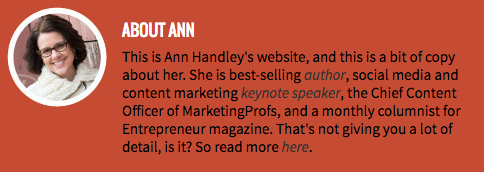
Ann Handley's professional bio on her personal website

"This is Ann Handley's website, and this is a bit of copy about her ... That's not giving you a lot of detail, is it? So read more here." This is the kind of simple, friendly language that invites the reader in rather than shutting them out.

Follow the link and you'll be led to a page dedicated to a fuller bio, which she's divided into two parts: a "short version" (literally a bulleted list of key facts) and a "long version," which includes traditional paragraphs. There's something in there for everyone.

2. Rebecca Bollwitt

Bio platform: Instagram

Instagram is a notoriously difficult platform on which to write a good bio. Similar to Twitter, you simply don't have room for a professional bio that includes everything about you. And because Instagram is primarily a mobile app, many viewers are reading about you passively on their mobile device.

Instagram's limited bio space requires you to highlight just your most important qualities, and blogging icon Rebecca Bollwitt does so in her own Instagram bio in an excellent way.

Rebecca's brand name is Miss604, and cleverly uses emojis in her Instagram bio to tell visitors exactly what makes her a valuable content creator. Take a look in the screenshot below.
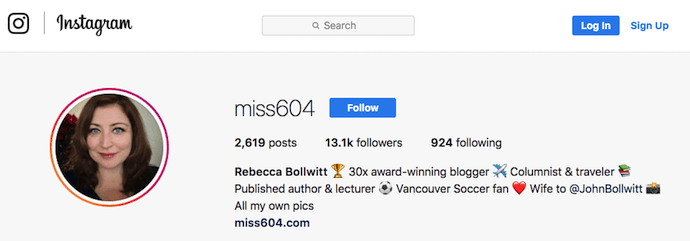
Miss604's professional bio on Instagram

Starting with a trophy emoji, Miss604 says she's won more than 30 awards for her blogging services. I haven't even looked at her pictures yet and the introduction of her bio has already sucked me in.

The rest of her bio follows suit, breaking up the text with an appropriate emoji and a perfect collection of nouns to tell me who she is as a person. She even links out to her husband's Instagram account after the heart emoji (an adorable addition), and assures her followers that all of her pictures are authentically hers.

Take a lesson from Miss604, and show your personal side. Just because you're branding yourself as a professional doesn't mean you have to take your human being hat off. Often your most personal attributes make for the best professional bio content.

3. Mark Gallion

Bio Platform: Twitter

As a venture capitalist and an executive at several start-ups, Mark Gallion has different versions of his bio all over the internet. You can imagine some are more formal than others. But when it comes to his Twitter bio, he carefully phrased his information in a way that helps him connect with his audience -- specifically, through the use of humor.
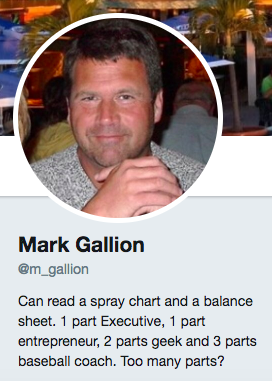
Mark Gallion's professional bio on Twitter

Why would he choose humor when he runs four start-ups and constantly seeks funding for them? Well, Mark's tactic is totally intentional: it's a lever he pulls to refresh his brand while maintaining his already impressive and established identity as an entrepreneur.

Mark leverages his Twitter bio because it’s place where he can be human. And it helps him relate to his followers and potential investors.

When crafting your own Twitter bio, consider your audience and the personal brand you're trying to create for yourself. Use it as an opportunity to be relatable. (And check out this list of amusing Twitter bios for inspiration.)

4. DJ Nexus

Bio Platform: Facebook

This New England-based DJ has single-handedly captured the Likes of more than 2,000 people in and beyond Boston, MA. And even if you don't listen to the type of music he produces, it's hard not to listen to his compelling Facebook bio.

Stage-named DJ Nexus, Jamerson's professional bio makes use of nearly every Page field inside the About tab. Right away, his audience knows which genres he plays in, where he's from, and who else he's worked with. The latter -- under "Affiliation," as shown in the screenshot below -- is unique and seldom mentioned in professional bios today.

Our favorite part about DJ Nexus's bio? His tagline, under "About" -- "Quiet during the day. QUITE LOUD at night!" DJ Nexus tells you when he works in an awesome way. I got goosebumps just imagining a dance club he might play his music in.
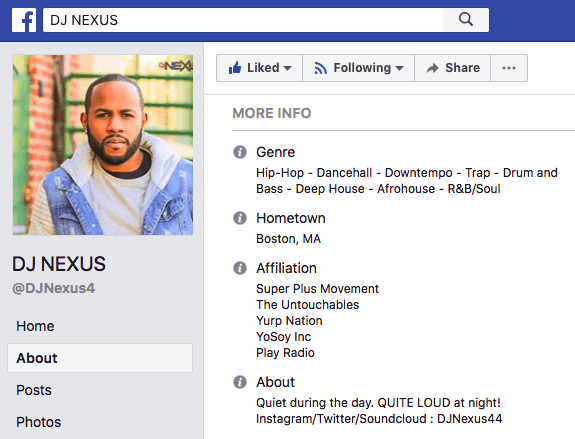
DJ Nexus's professional bio on Facebook

DJ Nexus's bio brilliance doesn't stop there.

The great thing about Facebook Business Pages is that you can write as much as you want without overwhelming your Page visitors. For those who just want Jamerson's basic info, they have the four categories shown above. For those who want to learn more about him, he tells an excellent story of his career. Here's just a preview of his story, below:
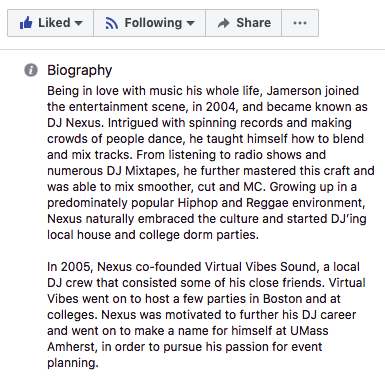
A story on DJ Nexus's Facebook Business Page

In this story, DJ Nexus describes both when he "became known as DJ Nexus" and a company he founded shortly afterward -- all before going to college. This is a terrific lesson for Facebook Businesses today: customers want to learn about you, and as Facebook increasingly becomes a place for meaningful interactions, there's no better place to tell your story than on your Facebook Business Page.

5. Lena Axelsson

Bio Platform: Industry Website

When it all comes down to it, your professional bio is no different than any other piece of persuasive copy -- no matter where it lives. One of the most common mistakes people make is thinking of it as its own beast, separate from other pieces of writing. If you think about it that way, you're far more likely to write something painfully uninteresting.

When you sit down to write your professional bio and you're watching that cursor blinking on the screen, think about how you would introduce a blog post. You don't just dive right into the meat of the thing, now, do you? No. You start with an introduction.

The best bios are often concise (around 200–300 words), so you don't have a lot of room to play around. But a single sentence that tees your reader up and provides context for the accomplishments that follow could make the rest of your bio that much more persuasive.

Take Lena Axelsson's bio, for instance. She's a marriage and family therapist -- a job where empathy and compassion are a big part of the job description. That's why she chooses to open her bio with a great introductory sentence: "When human beings experience trauma or severe life stressors, it is not uncommon for their lives to unravel."
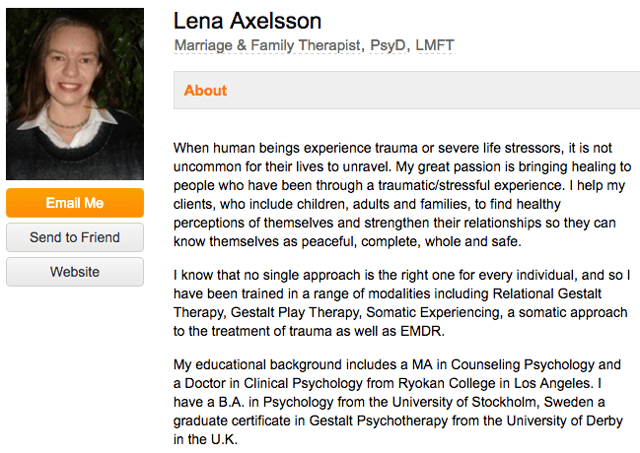
Lena Axelsson's professional bio on an industry website for therapists

Then, she goes into why she's passionate about her job, how she helps her clients, and how she caters her approach to each individual patient. The necessary educational information is left for the end, after the reader has been hooked.

Your bio doesn't have to be super serious, nor does it have to start with a joke. This bio shows how you can capture your reader's attention by being empathetic and showing how that empathy shapes a valuable professional.

6. Mark Levy

Bio Platform: Personal Website

Mark Levy is a small business owner who's taken a more traditional approach to the professional bio on his website -- but in a way that takes care to speak to his intended audience.

What we love about his bio is the way he's set it up: On his business' "About" page, he's listed two biographies, which he's labeled "Mark Levy's Biography #1" and "Mark Levy's Biography #2."
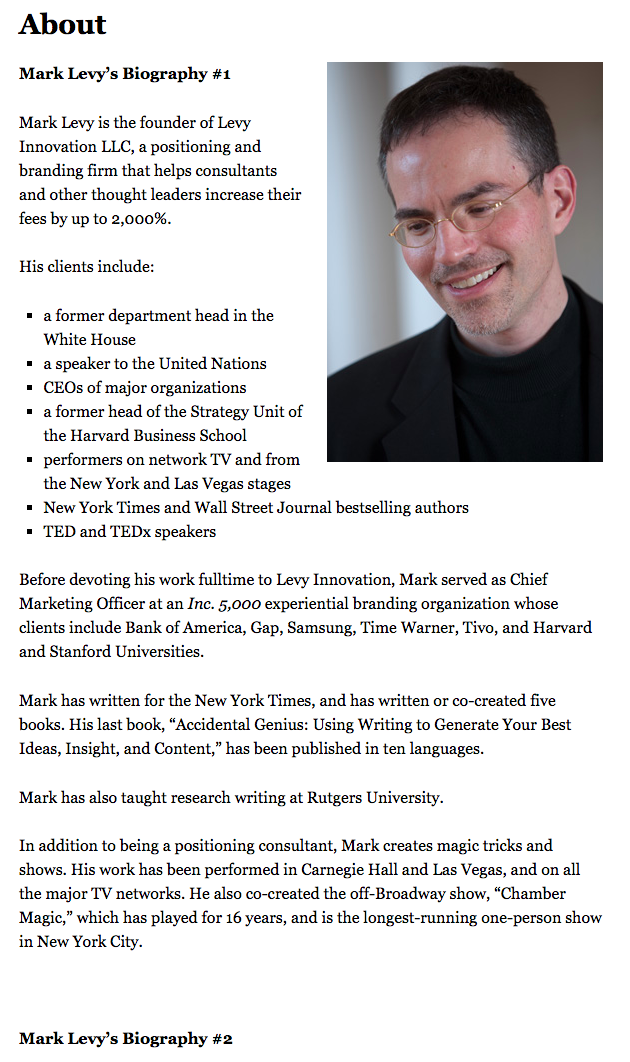
Mark Levy's professional bio in his personal website

Click here to see the full version.

Like Ann, Mark's given his readers two different options. The first biography is a "short version," which includes a combination of bullet points listing his credentials and a few short paragraphs.

The second is the "long version," which is actually even more interesting than the first one. Why? Because it reads like a story -- a compelling one, at that. In fact, it gets really funny at parts.

The second sentence of the bio reads: "He was frightened of public school, loved playing baseball and football, ran home to watch ape films on the 4:30 Movie, listened to The Jam and The Buzzcocks, and read magic trick books."

Here's another excerpt from the middle:
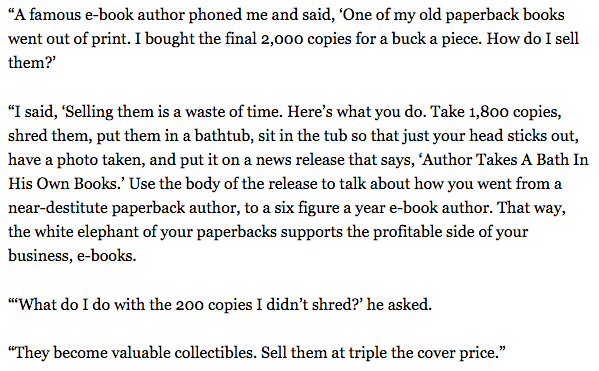
mark-levy-long-bio-snippet.png

Of course, the fantastic copywriting isn't a surprise, given that this guy wrote several books. But the conversational tone and entertaining copy let his quirky personality (and great writing skills) shine.

7. Corey Wainwright

Bio Platform: Blog Byline

Finally, we have Corey Wainwright, who's the director of content here at HubSpot. She's written content for HubSpot's Marketing Blog for years, and her blog author bio has caught my eye since before I ever started working for HubSpot. (Back then, it started with, "Corey just took a cool vacation.")

What I love most about Corey's bio is that it's a great example of how to deliver information about yourself without taking things too seriously. And in this context, that's totally appropriate.

Despite having a number of impressive accomplishments under her belt, she simply doesn't like displaying them publicly. So, she prefers making her author bio a little more "light."

Her bio (pictured below) reads, "Corey is a Bruce Springsteen fan who does content marketing, in that order."
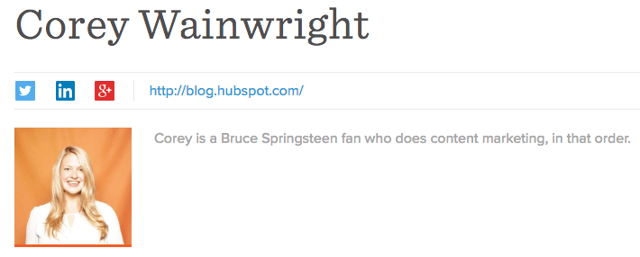
Corey Wrainwright's professional bio as a blog byline for HubSpot

It works in this particular context because, at HubSpot, our blog authors often prefer to make themselves as friendly and approachable as possible -- while letting the content speak for itself.

It helps that authors' social media accounts are located right below our names and above our pictures. For folks who really do want a list of Corey's credentials, they can click the LinkedIn button to go to her LinkedIn page. (You can read this blog post to learn how to create social media buttons and add them to your website.)

8. Marie Mikhail

Bio Platform: LinkedIn

Marie Mikhail checks off nearly every box for what makes an excellent bio. A professional recruiter, she expresses her "passion for recruiting" upfront, in the first sentence, while using that sentence to hook her profile visitors into a brief story of her background.
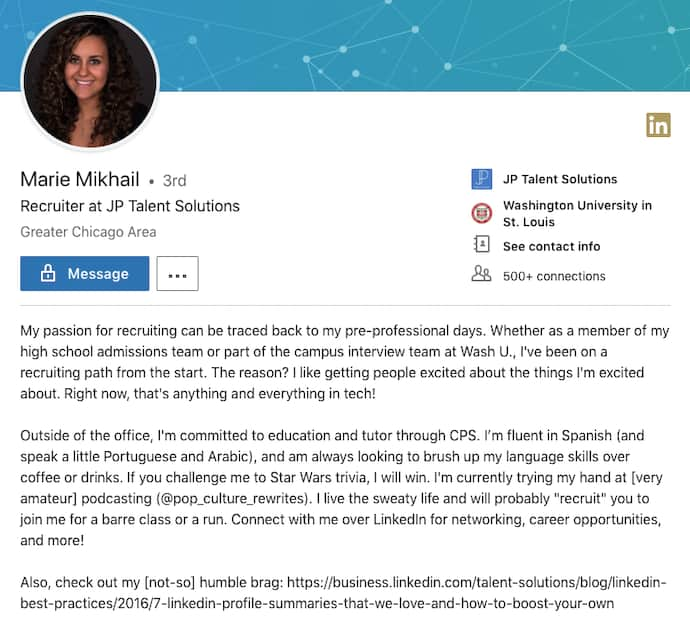
Marie Mikhail's professional bio on LinkedIn

But there are a lot of recruiters out there, and Marie knows that. So, to differentiate herself, she closes the first paragraph of her bio explaining that she likes "getting people excited about the things [she's] excited about." It's a well-put value proposition that sets her apart from the rest of the HR industry.

Marie Mikhail finishes off her bio by including a smooth mixture of professional skills, such as her Spanish fluency; and personal interests, such as podcasting and Star Wars (she mentions the latter with just the right amount of humor).

Want more? Read How to Write a Cover Letter That Gets You the Job [Bookmarkable Template + Examples].
New Call-to-action


from Marketing https://blog.hubspot.com/marketing/professional-bio-examples

These Were Our Top 10 Tech News Stories of 2018. Here's What They Say About Next Year's Trends.

Here at HubSpot, we're big fans of trying new things.

We're into experimentation. We're into approaching our work differently than we may have previously, and taking on new projects that -- we hope -- will result in providing something that is helpful to those who come to us for information.

A little over a year ago, we embarked on such a journey: one that would bring the latest news and trends in the technology realm in a way that's relevant to marketers and small-to-midsize businesses.

Now, as 2018 is coming to a close, we're looking back on the news we've covered this year, and which stories were the most popular. To us, that's a key indicator to the most pivotal moments in tech this year, and a key to predicting what's to come in 2019.

These are our top 10 news stories of 2018 -- and what they say about the tech landscape this year, as well as what to look out for in the next.

Our Top 10 Tech News Stories of 2018

1. "Here Are the Top Marketing Design Trends for 2018 [Infographic]"

779_SSTK_Core_TrendsIFGC_Static_english (1)-1

Shutterstock, a familiar name to many creative professionals, kicked off the year with its 2018 Creative Trends Report to summarize design trends marketers might want to know about. We wrote up the report -- and it was our #1 news post of 2018.

The report was the result of synthesizing and analyzing the billions of searches for visual content on Shutterstock’s collection -- which boasts over 170 million images -- and determining which design concepts were most likely to influence creative marketing and design.

779_SSTK_Core_TrendsIFGC_Static_english (1)

The release of the report might have been a nod to the deemed value of visuals -- you can check out some statistics on how it can boost marketing content across a variety of formats and channels here -- as well as what many predicted to be key trends beyond imagery based on searches and top news stories from the previous year.

Looking ahead to next year, we wouldn't be entirely surprised to see design themes pertaining to "a global march" continue to trend -- with perhaps some inspiration from this year's much-discussed tech topics, like automation.

2. What's Happening at Facebook? A Breakdown of the Ongoing Data Story

Facebook%20Data%20Story

Who could forget what was arguably 2018's biggest tech story of the year: The improper harvesting of personal Facebook user data by a voter profiling firm Cambridge Analytica to help inform and compose influential messaging to sway consumers ... or voters.

The harvesting activity left 87 million accounts jeopardized -- and set into motion a series of events that would shape the way people discussed and used social media throughout the rest of the year.

Social networks modified the way everyday users, brands, and app developers could use them, with modifications made to their terms of service, data use rules, and privacy policies. Tech executives appeared in high profile hearings and testimonies before U.S. and European lawmakers. And after news of the Cambridge Analytica data issue emerged -- it seemed that the negative reports about Facebook just kept coming.

zuckerberg-hearings-more-questions

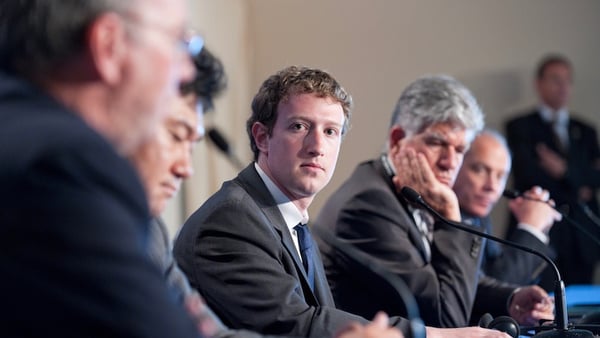
Mark Zuckerberg makes opening remarks before members of the U.S. House of Representatives in April 2018. Photo: Amanda Zantal-Wiener

How this news will continue to reverberate into the next year remains to be seen, but it could go in a number of directions. Although less-than-positive stories about Facebook continue to emerge in the last month of 2018, our research has repeatedly shown that most users have yet to stray from the network for a number of reasons.

3. Here Are the 7 Top Tech Trends to Watch in 2018, According to CES

ces-logo

Every January, the Consumer Electronics Association hosts the annual (and potentially largest) Consumer Electronics Show (CES) in Las Vegas, Nevada -- where events often begin with a projection of the top tech trends to come that year.

For 2018, it was predicted that the following seven trends would dominate the year:

  1. 5G
  2. Artificial Intelligence
  3. Robotics
  4. Voice: The Fourth Sales Channel
  5. Facial Recognition on the Go
  6. Virtual Reality
  7. Smart Cities

While some of these trends panned out more than others -- 5G and virtual reality both have yet to make the big splash that was anticipated -- while voice technology continues to progress and appear on a number of different platforms. And seeing as 25% of people believe that all searches will be done by voice within the next five years, we wouldn't surprised to see that trend continue to progress.

4. I Downloaded My Facebook Data and It Got Weird Fast

server-room-dark1

One of the key items to result from Facebook's Cambridge Analytica crisis was the company giving users the ability to download their full personal user data files. We decided to give that option a try, and it was ... an odd experience.

One of the highlights, if you will, of the report was that it includes a record of user activity Messenger -- that is, it contains a transcript of every Messenger interaction, replete with any photo or video files shared in those conversations.

Looking ahead to 2019, it's hard to predict exactly how user privacy and data protection will be approached by companies or lawmakers -- but 2018 has heard much reverberating talk of creating some sort of regulation pertaining to it within the U.S. after a year of incidents across a number of industries. (In the European Union, the General Data Protection Regulation [GDPR] came into force in May this year.)

Just this month, for instance, news emerged that 500 million people were impacted by a breach of Marriott customer data.

"It seems like every other day we learn about a new mega-breach affecting the personal data of millions of Americans," Senator Mark Warner said in response. "Rather than accepting this trend as the new normal, this latest incident should strengthen Congress’ resolve."

5. Facebook Page Engagement Has Dropped 50%, According to New Data

buffer-facebook-page-post-analysis

Before news of the Cambridge Analytica scandal broke in March, Facebook kicked off the year with another big announcement: It would be revamping its News Feed algorithm to prioritize content from friends and family over that from pages.

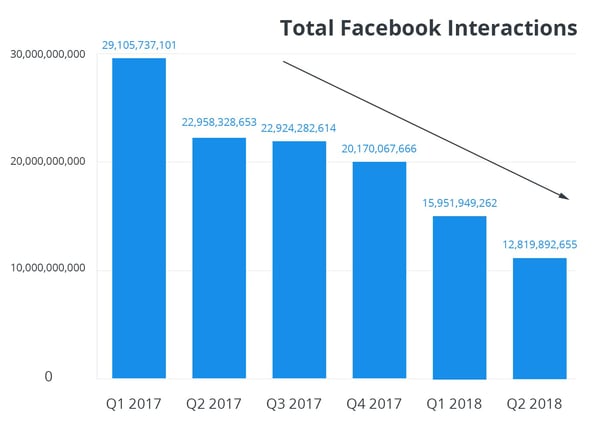
By August, that change had result in a drop in engagement for Business Pages -- within some categories, by as much as 50%.

Total-Facebook-Interactions

Source: Buffer

And while our research has shown that users within the U.S., UK, and Canada are reluctant to leave Facebook, the primary reason across the board is to maintain connections with friends and family -- not to follow brands or other pages.

So, will this trend continue into the new year? Possibly. Throughout its 2018 earnings reports, Facebook saw plateaued growth in the U.S. and Canada, which could have resulted from the combination of decreased Page engagement, a narrowing number of advertising channels, and slowed user growth. But that doesn't mean that marketers should give up on social media completely.

"The best way to reach our audiences on Facebook is to study the data, experiment constantly, be open to learning," wrote the authors of the study we used to report on this trend, "and take a growth mindset."

6. Want to Win at Social Media? Here's What Followers Want, According to Experts at SXSW

sxsw%20social%20media%20panel

Every March, enthusiasts and experts from all corners of the world -- from interactive fields, to film, to music -- gather in Austin, Texas for several days of education and experiences that celebrate their respective fields.

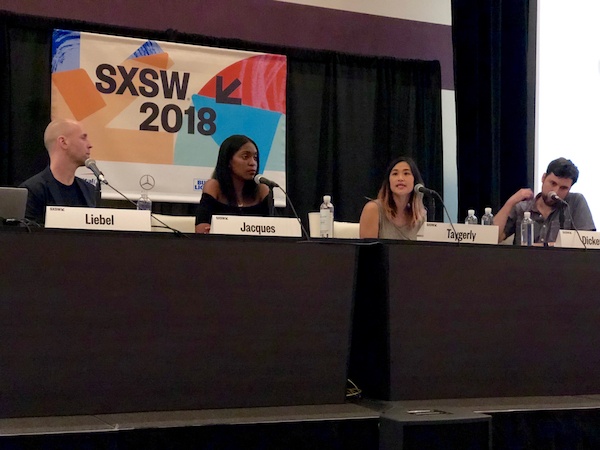
This year, Teen Vogue's Rajni Lucienne Jacques, Facebook's Tutti Taygerly, and Instagram's Joshua Dickens gathered on a panel to share their insights on what followers want the most in today's climate.

Their key takeaways:

  • Users want to find communities online. "In fact, said Jacques, "Social media is the one thing that galvanizes a movement. [It] allows people to gather in a way that is faster and more efficient."
  • Users want privacy. Seriously. "What should be shared just with friends and family, and what should be public?" asked Tayerly. And what, she continued, "is the demarcation between those two worlds?”
  • Users want a place to share their stories. Social media, explained Jacques, "gives a voice to those who never thought they had a voice. ... Why don’t we say, 'We’re inviting you in to tell your stories that you’re already telling your peers'?"
  • Users want smaller networks. "Sometimes, it’s easier to share more intimately in a group," said Taygerly. And the answer to that, she said, may lie in "smaller, more intimate social networks."

Note: This panel discussion took place a mere few days before news of Facebook's Cambridge Analytica crisis broke. If anything -- and as a result -- in the year to come, these points may become even more true.

7. Facebook's News Feed Will Once Again Focus on Friends and Family

FB%20News%20Feed%20Closer

Even though we mentioned this story earlier, it wasn't quite as big a story over the course of 2018 as the drop in Facebook Page Engagement that potentially resulted from it.

But to reiterate: In January, Facebook announced that it would overhaul its News Feed to shift the type of content users see first, and most often. The reason, according to the company's official statement: "So people have more opportunities to interact with the people they care about."

While news of the Cambridge Analytica crisis hadn't yet surfaced when this change was made, the News Feed algorithm update was likely made in response to and earlier Facebook scandal -- when details emerged that the network had been weaponized by foreign actors to spread misinformation and influence the 2016 U.S. presidential election.

Again, our data reflects that this emphasis on "personal network" content will continue to through the next year -- especially as Facebook begins to explore other revenue channels in the face of the aforementioned slowed user growth, such as advertising through WhatsApp, one of its portfolio companies.

"Facebook has clearly put a stake in the ground that user experience is more important that the brands that pay them," said HubSpot Senior Product Marketing Manager Marcus Andrews at the time. "By making this shift they clearly prioritized one over the other."

8. 4 Things We Want to Know After Reading Mary Meeker's 2018 Internet Trends Report

Mary-meeker-hed-2015%20%281%29

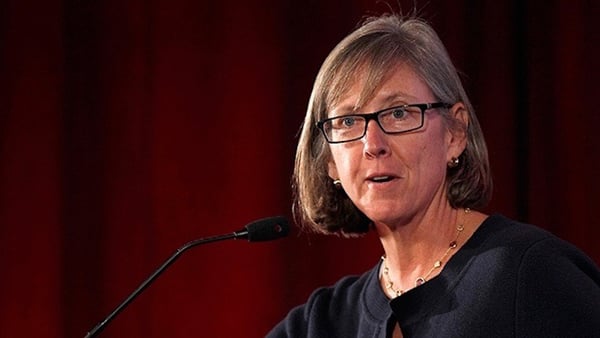
Source: Jasveer10 [CC BY-SA 4.0], from Wikimedia Commons / Cropped from original

Each year, marketers, tech writers, and overall online enthusiasts await the release of the Internet Trends Report: an annual presentation by former Kleiner Perkins Caufield & Byers partner Mary Meeker, covering the year's most pivotal statistics and trends in the online realm.

Meeker has since left the firm, leaving many pondering the fate of her annual report in 2019.

But in 2018, the report was the subject of one of our top news stories, and left us with four key questions. Now, a few months later, here are the potential answers we see for the coming year.

The time internet users spend online has increased, but when it comes to the number of new internet users, growth has significantly slowed. Does the future of growth reside in ways for people to connect, rather than getting more people online?

Possibly. While growth on Facebook has plateaued, companies are creating more ways for people to connect, particularly by way of gamified and chat-fueled video programming.

If the answer to that question is "yes," could this trend be a “golden ticket” for emerging technology like virtual reality, which has struggled to get a strong foothold in consumer and business markets alike?

Not really -- not yet, at least. Have a look at our data on what's slowing the progress of virtual reality as a mainstream technology.

Meeker speaks to the “privacy paradox”: that as innovation becomes a broader channel for growth, it involves a higher degree of personalization that can inevitably require personal user data. Can there be innovation with regulation?

The idea of "data protection for a price" is not new -- and given the aforementioned breach news, isn't going anywhere -- nor is it tremendously popular, according to our research. When we surveyed a panel of 893 consumers across the U.S., UK, and Canada to find out how many would pay for an ad-free version of Facebook, 64% said "no." But knowing how this will impact innovation and the industry at-large would require a side-by-side, longer-term comparison of what these varying levels of regulation look like -- especially in the months that have followed GDPR coming into force.

What, if any, is the psychological impact of the growing amount of time we spend online?

Well, it might not look great -- though it would be interesting to measure user sentiment and response to this question now that more companies and apps -- like Apple, Facebook, and Instagram -- all rolled out dashboards in 2018 to give users a snapshot of how much time they spend using each. How that will bleed into the way we approach time spent online in 2019 remains to be seen.

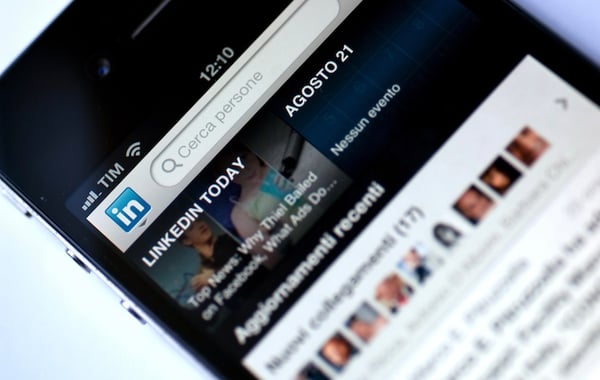
9. "The Robin Hood of Algorithms": Why LinkedIn's New Feed Could Be a Game Changer for Marketers

new-linkedin-feed-algorithm

Earlier this year, LinkedIn announced that it plans to overhaul its feed ranking system to help more creators get better engagement on the content they share. The changes were spurred when the professional networking site discovered that the top 1% of content creators -- also known as "power users," or perhaps influencers -- were receiving the vast majority of engagement with their posts.

Meanwhile, the remaining 98%, the site says, was "receiving less [engagement] than ever."

But LinkedIn's 2018 changes didn't end there. The network is also rumored to encroaching on the success of its social media peers by introducing features similar to those found on Facebook and Snapchat, for instance, like "reactions" and Stories.

As Facebook's active user counts plateau in its most lucrative markets, it's left many speculating if other users are working to leverage that development -- as well as the less-than-positive attention it's received this year -- to create networks for users and businesses alike that could, (way) down the line, replace it.

And while there's always room for the element of surprise, given the sentiment we've measured about the widespread reluctance to leave Facebook, its audience of 2.2 billion users seems unlikely to be replaced within the next year.

10. Here's How Featured Snippets Work, According to Google

google%20featured%20snippets

Last -- but certainly not least -- we arrive at one of our top stories of the year, and it's about Google.

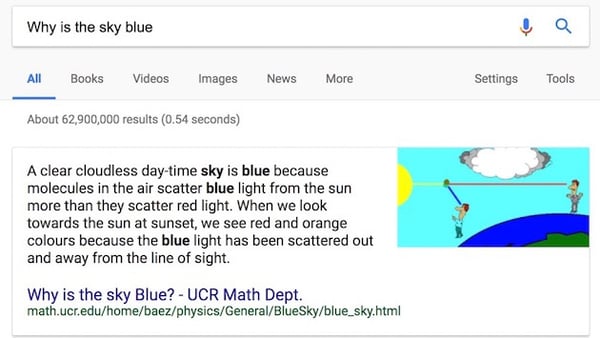
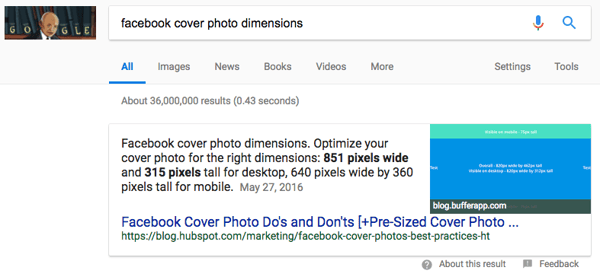
In 2018, the search engine giant decided to shed a bit of light on featured snippets: a concise response to a Google search query. It's displayed on top of the general results, and also includes the page's publication date, title, and URL.

Screen%20Shot%202018-02-01%20at%202.28.21%20PM

2018 saw quite a few changes for Google's search engine results page (SERP) -- from experimenting with double featured snippets to, well, no search results at all.

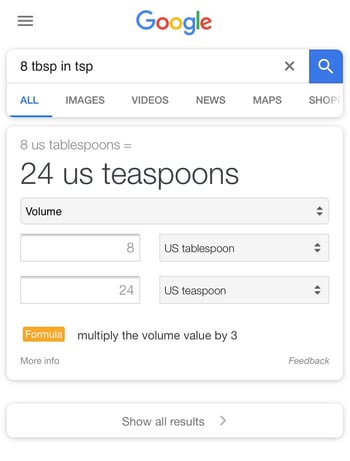
In the context of that latter development, the #10 story on this list almost seems like old news. But, yes: We've officially arrived in the "zero search results era," where Google provides a single answer to queries about local time and mathematical conversions or calculations -- e.g., "8 tbsp in tsp" -- without displaying any other search results.

IMG_4485

If this development seems to align with some of our thoughts and stories of voice search -- that's because it does. In fact, it could be argued that we were living in a zero search results era even before the above feature was officially discovered and confirmed by Google, since voice search results don't actually yield a visual list of links to visit for information.

And as voice assistants continue to make their ways onto a growing number of smart hardware devices, it's highly likely that this trend will continue.

Cheers to what all of this will look like -- or sound like -- in 2019.


from Marketing https://blog.hubspot.com/marketing/top-10-tech-news-stories-of-2018

7 Amazing Sample Answers to "What Makes You Unique?"

There are plenty of things that make each one of us unique.

For instance, here are a few quirks of mine -- I put my phone on airplane mode every night around 9 p.m. to avoid distractions, even though plenty of my friends have pointed out that the silence button works too. I can't sit still for long periods of time, so I regularly do laps around the office. And I can't leave my apartment, no matter how late I am, until my bed is made.

Free Kit: Everything You Need for Your Job Search

None of which I'd admit in an interview.

The interview question, "What makes you unique?" is not an opportunity to confess weird habits or odd quirks. It's a chance to provide the interviewer with insight into how you'd be the best candidate for a role, while proving you're someone who can think on her feet.

Essentially, "What makes you unique" really means, "What makes you an exceptionally good candidate?"

To avoid an awkward conversation, you'll want to be prepared to answer "What makes you unique" in an interview. Here are seven sample answers to ensure you're proving yourself an incredibly valuable company asset.

7 Sample Answers to "What Makes You Unique?" and Why They Work

1. "I am a very good communicator and find it's easy for me to relate to other people."

Consider mentioning a personality trait you feel would be a good fit for the business. After reading the job description, make a list of attributes that could make you an exceptional candidate.

Additionally, including a personality trait in your answer allows you to display how you're a good fit for a role in which you have little prior experience.

For instance, if you're applying for a position as a team leader, it's critical that you demonstrate strong communication skills and an ability to connect with a diverse group of people. If you tell the interviewer, "I am a very good communicator and find it's easy for me to relate to other people", you're able to match your personality to components of a successful leader.

2. "I really enjoy learning new things and am constantly seeking out new learning opportunities."

By mentioning your passion for learning new things, you're demonstrating you're growth-focused and unafraid of challenges.

Additionally, answering the question in this way allows you to remind the interviewer why you're uniquely qualified for the role -- while other candidates might have more prior experience in the industry, you're proving your desire to exceed expectations of the job quickly.

3. "My prior experience in customer service has provided me with unique technical skills that I can apply to this role."

If you have prior experience in a role vastly different from the one for which you're applying, you might use this as an opportunity to explain how your background uniquely qualifies you. With an answer like this one, you're able to alleviate concerns the interviewer might have with your lack of experience in the field.

It's critical, however, that you provide specific examples of how your prior experience has provided you with certain transferrable skills. For instance, you might say, "My prior experience in customer service provided me with technical skills and an extensive knowledge base for how our product works. As a marketer, I will be able to use this knowledge to ensure we're meeting our customers needs with every campaign we launch."

4. "Working at a startup gave me an opportunity to understand the ins-and-outs of the industry, and to take on tasks I might not have at a larger company. I think this experience gives me a slight edge over other applicants."

Similar to the answer above, this answer is a good one if you're attempting to switch industries. If you think your prior experience could deter interviewers from seeing you as exceptionally qualified, this is an optimal chance to prove them wrong. Consider how your background has allowed you to gain unique skills that others, who followed a more linear career trajectory, might not have. 

For instance, if you previously worked at a small startup and now you want to transfer to a large corporation, it's important you mention how those skills will make you successful in this new role.

5. "I'm not afraid of failure. In fact, I think it is an essential part of the experimental process that gets you to success. For example … "

This answer shows your interviewer that you're not afraid to take risks. Of course, you'll only want to say this if you have a positive example to reinforce the importance of failure in the workplace.

You don't want to sound like you make mistakes all the time, but you'll stand out if you mention how you turned a failure into a success.

For instance, you might say, "I'm not afraid of failure. In my last role, we tried to streamline our SEO process and, along the way, found we'd accidentally decreased traffic to our site. However, this initial failure allowed me to see the errors in our previous procedure. My team and I came up with a more successful strategy to avoid these mistakes in the future, and ended up increasing traffic by 20%."

With this answer, you're showing you're capable of remaining flexible and open-minded when something doesn't work right away, and you know how to take failures and use them as learning opportunities -- a critical skill for any work environment.

6. "When solving problems, I apply both logic and emotional aspects in equal proportion. For instance, I'm trained in SEO and understand how to use analytics to ensure a marketing campaign is successful, but I also majored in design and know how to apply creativity to a project as well."

If you're stuck on deciding how to demonstrate your unique qualifications, start by thinking about how other people approach problems at your company, and how you differ.

For instance, most people are either logical and use analytics to solve problems, or emotional and use creativity. It's rare to find someone who is both. If you truly believe you combine these two aspects, it's an impressive ability you should highlight.

7. "I'm exceptionally organized, and at my last company, I was able to apply this skill to improve our process and increase ROI by 33%."

Remember, when your interviewee asks "what makes you unique", she's really wondering "how will you help our company?" At the end of the day, it's critical you tie your answer back to how you will solve problems for the company.

To avoid sounding like you're bragging, consider a personality trait or skill set that helped your last company achieve results. If the results are quantitative, make sure you have the specific numbers to support your claim. However, it's also appropriate to share qualitative results, such as, "my organizational skills led my manager to trusting me with a major project within the first two months in my role." Ultimately, providing examples shows the interviewer you're results-driven, and aren't just saying generic phrases to answer her question.

Interview Kit for Job Seekers


from Marketing https://blog.hubspot.com/marketing/what-makes-you-unique

The Ultimate Guide to Google Slides

Slide decks are ubiquitous in the business world. To present new findings or strategies, train new employees, and even sell your product, you’ll often use a deck to easily convey information and visually engage an audience.

One of the best tools for creating slide decks is Google Slides, which is included with your free Gmail account and connected to the cloud, so you can access all your presentations from any computer.

To help you create a presentation with Google Slides, we’ve created a handy, bookmarkable guide that’ll show you how to turn a blank deck into a compelling one. Read on to learn how.

Google Slides Tutorial

1. Create or import a presentation.

To create a new presentation in Google Slides, go to your Google Drive, click new, and select “Google Slides”.

If you want to import and convert an existing presentation from PowerPoint to Slides, go to your Google Drive, click new, and select “File Upload”.

2. Title your presentation.

Click “Untitled presentation” to title your presentation.

3. Add text to your presentation.

Click each slide to add text to your presentation. Each of your text boxes’ size and placement is adjustable. To add another text box to your presentation, click “Insert”, select “Text box”, and place and size your text box however you want.

4. Insert media, shapes, tables, charts, diagrams, word art, lines, and animation to your presentation.

Click “Insert” and choose “Image”, “Video”, “Shape”, “Table”, “Chart”, “Diagram”, “Word Art”, “Line”, or “Animation” to place these elements in your presentation. You can also move, re-size, and delete these elements.

5. Arrange your presentation’s slides.

To add a new slide to your presentation, click the “+” button on the far left side of your toolbar.

If you want to move a slide to a different spot in your presentation, drag it to your preferred location. To move multiple slides within your presentation, press the “Ctrl” button on your keyboard and click the slides you want to move around.

If you want to duplicate a slide, right-click it and choose “Duplicate slide” in the toolbar. To delete a slide, right-click it and choose ”Delete” in the toolbar.

6. Add speaker notes to help you stay on script during your presentation.

In each of your slides, you can add speaker notes at the bottom of your page to stay on script during your presentation.

7. Pick your presentation’s theme and layout.

After you finish fleshing out your presentation, pick a theme and layout to make it more visually engaging and consistent. To choose a theme, click “Theme” in the toolbar and a wide selection of themes will pop up on the far right side of your page.

If you don’t like any of the themes Google Slides offers, click “Import Theme” at the bottom of the popup. You can implement the themes from any of the presentations you’ve created, edited, or viewed in the past. You can also upload themes from existing PowerPoints that are saved on your computer.

8. Share your presentation to collaborate with others.

After you finish creating your presentation, you can share your presentation with others so they can edit, comment on, or view it. To do this, click “Share” at the top right corner of your page.

If you want to collaborate with others and polish your presentation, you can comment on any element of your presentation and direct comments to specific people.

To comment on your presentation, click the comment icon, which is right next to the “Present” button at the top right corner of your page.

To address comments to specific people, press the “+” button on your keyboard and type in your colleague’s email address.

9. Present your slideshow.

When you're ready to present your slideshow, click the “Present” button at the top right corner of your page.

If you want to look at your speaker notes during your presentation, click the down arrow and choose “Presenter view”.

Another useful feature Google Slides offers is “Pointer” -- it can turn your mouse into a laser pointer during your presentation. To use it, click the “Pointer” button at the bottom of your page.

If you’re presenting on a tight schedule, it might be easier to field questions during your presentation rather than after. Fortunately, with Google Slides, you can host a Q&A during your presentation by clicking the “Q&A” button at the bottom of your page.

When you do this, a web page asking you if you want to accept questions from your audience will pop up. The questions your audience asks will also appear on this web page.

If you decide to field questions from your audience during your presentation, it’ll look like this:

Your audience can click on the link at the top of the presentation, which will direct them to a new page where they can enter their questions.

10. Download your presentation in other formats.

Once you’ve completed your presentation, you can download it as another format to send to your audience or keep for future reference. To do this, choose “File” and “Download as” to download your presentation as one of the following formats:

  • Microsoft PowerPoint (.pptx)
  • ODP (.odp)
  • Text File
  • PDF
  • JPEG
  • PNG
  • Scalable Vector Graphics (.svg)

There you have it. We hope this guide to using Google Slides will help you create and present compelling slide decks that will captivate your colleagues and potential customers. Happy presenting!


from Marketing https://blog.hubspot.com/marketing/google-slides

How to host a memorable event

It is useful to think about the elements for a truly memorable event. There are certain things to contemplate prior to the big day so that nothing unexpected occurs.

The following paragraphs offer some helpful insights for anyone planning an event in the near future.

Execution itself is not all there is to a great event. Professional planners take pride in the preparation they undergo so that mishaps and hiccups can be avoided.

Many make the mistake of focusing on tactical notions without first having a strategy in place. This is a recipe for trouble. The 10 concepts that follow below may not be exhaustive, but they do provide a solid framework for having a terrific event.


  1. Have A Clear Set Of Goals

To be able to assess whether your planning has been effective, it is necessary to have some attainable objectives in place. While the event is happening, you will know the things to watch for, and you will have a set of benchmarks for post-event review to measure your business performance.


  1. Choose Helpers With Care

For a conference of several hundred, having a pair of people that are good listeners and able to pitch in at anytime is key. Find individuals that possess these traits.


  1. Marketing Matters

Though the concept of the 4p’s is an old one, it is tried and true for a reason. Have you declared the 4p’s of the event you are planning?


  1. Advance Planning

Event planners who lack this talent will find themselves drowning in no time. Organise your food, lighting, sound people, professional speakers and other factors well in advance.Learn how advance thinking can benefit your process.


  1. Target Effectively

Make sure that your event is designed to suit the audience you will have. Knowing your crowd will make all the difference.


  1. Promotion

While you may have mastered the art of set-up, decoration and logistics, it is all for nothing if you are unable to attract a substantial audience. Let your desired attendees know what your event has to offer and why they need to be there.


  1. Get To Know The Stakeholders

What audiences stand to benefit from the event? How will your effectiveness be assessed by them? These are essential questions that must be asked.

  1. Establish A Stakeholder Hierarchy

Which of the folks in tip 4 will have the greatest influence on my goals and success? Determine the answer and adjust accordingly.


  1. Measure Customer Satisfaction

While experiences had at events may be somewhat intangible, this does not mean that there is no success measurement possible. Discover new methods of quantifying satisfaction. Retention is a key element of satisfaction, and this measurement can be used to get new business in the future.


  1. Remain Aware And Vigilant At All Times

Stay on top of what is happening in all areas of the event itself. Is the reception area buzzing while attendees should be in the primary conference room? Can stewards nudge people to where they need to go? Keep these questions at the forefront and get to solutions promptly.


The post How to host a memorable event appeared first on TheMarketingblog.


from TheMarketingblog http://www.themarketingblog.co.uk/2018/12/how-to-host-a-memorable-event/