Monday, 3 December 2018

How to Create a Revenue-Generating Google Ads Campaign

No matter how many free tools crop up for ecommerce companies, a paid ad is sometimes your best bet for driving traffic to (and conversions from) your website.

The problem is other ecommerce and even brick-and-mortar competitors are using the same search terms and keywords you will. Not only do you need to know how to build a campaign through Google Ads, but you also need to know how to stand out from the crowd.

Create a Google Ads campaign that makes money for your business using this essential guide.

We'll start with a few real examples of AdWords campaigns -- a service now known as simply Google Ads -- and then throw in some pro tips for succeeding with your own search engine marketing strategy. By the time we're done, you'll be an expert.

1. New Breed Marketing

Search term: what is inbound marketing

new-breed-marketing-adwords-campaign

Links to:

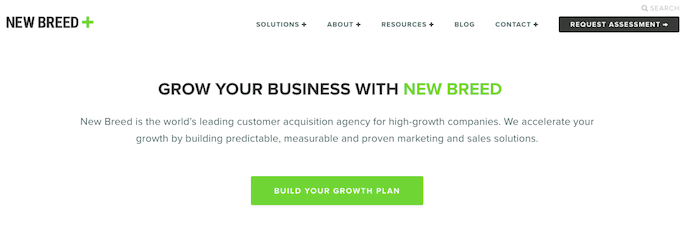
new-breed-marketing-landing-page

Some searchers might be ready to purchase something, but need to make sure what you're selling is what they're buying. That's the thinking behind the first AdWords campaign example, above.

New Breed Marketing, an agency partner of HubSpot, is an inbound marketing service provider. But because New Breed's customers might not know the services they want by the term, "inbound marketing," the company sought to define the term for them -- helping buyers confirm that inbound marketing is indeed what they're looking for.

New Breed Marketing's Google AdWords result, above, is as simple as search engine marketing gets. The meta-description is just one sentence long but indicates to searchers that inbound marketing is a "process" to be invested in.

Meanwhile, the blue link itself promises to explain inbound marketing in the form of a downloadable "guide." This ensures those who click through to the website are prepared to submit their contact information and become a lead in exchange for that guide. Remember, AdWords campaigns cost you money every time somebody clicks on your ads -- you need to get something out of those clicks.

2. Nettitude

Search term: cybersecurity

nettitude-adwords-campaign

Links to:

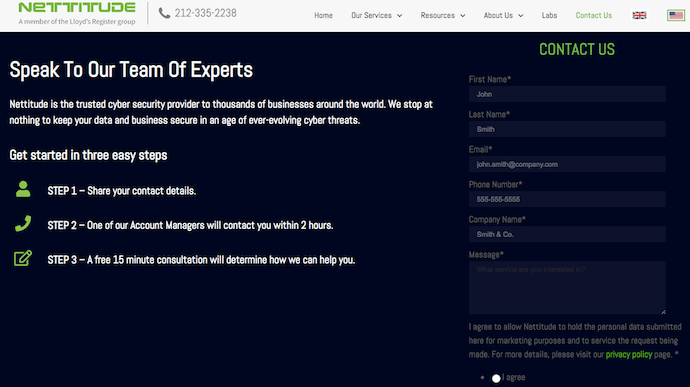
nettitude-landing-page

In general, the broader the search term, the less likely the searcher is to want to buy something right away (a pay-per-click concept called "match types"). In the AdWords campaign above, however, Nettitude bid on a broad, one-word search term -- "cybersecurity." While this broad search term doesn't target a specific searcher, the details of their Google Ad ensure the link can satisfy many different types of searchers no matter what their interest was when they typed in the word.

Nettitude's AdWords campaign, above, does two things well:

  • First, its meta-description has several value propositions that most cybersecurity customers would be receptive to. This includes a "2 hour response time" and a "free initial consultation" to make a prospect's initial outreach convenient and low-commitment.
  • Second, the ad displays a phone number directly on the page. When you bid on a search term that yields such a broad, diverse group of people, getting them on the phone is often the easiest way to nurture their interest so they don't wander off to another search result and forget about you.

3. Rock Content

Search term: content marketing course

rock-content-adwords-campaignLinks to:

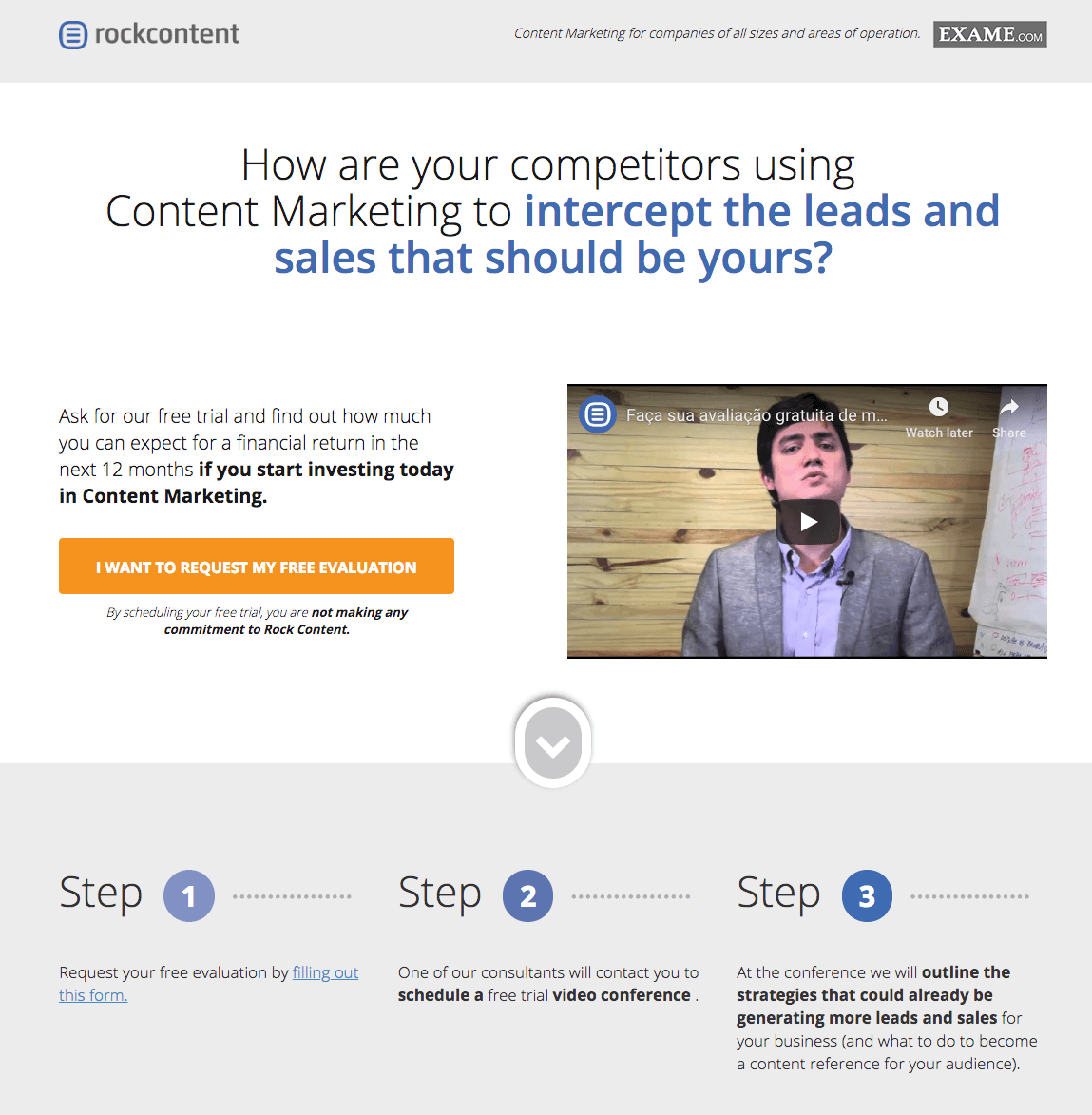
rock-content-landing-page

Rock Content, an agency partner of HubSpot, is a content marketing service based in Brazil. Its AdWords campaign, above, bid on a search term that's only somewhat related to the service Rock Content is offering on its landing page. But here's why it works.

The search term, "content marketing course," is intent on finding classes that help marketers increase their content marketing knowledge. Rock Content looks to pivot searchers from taking a class for improving their content knowledge to entering an "evaluation" for determining how much they already know.

This evaluation might not satisfy every searcher, but it is a smart way of pivoting their interest to a related service and introducing them to Rock Content's offerings at the same time.

4. Destination Canada

Search term: cheap holiday destinations

destination-canada-adwords-campaign

Links to:

destination-canada-landing-pageSimilar to the third AdWords example on this list, this campaign example by Destination Canada pivots off of broad search term to drive value into its own offering.

Canada Destination's Google Ads campaign, above, uses a searcher's general interest in taking a holiday trip to advertise all the fun parts of Canada. It's not a casual article, but it's also not a flight itinerary -- that middle-of-the-funnel space is what makes this campaign work so well.

The link above also uses two sub-links beneath the main blue link, highlighting the key subjects covered in the website to maximize the ad's clickthrough rate.

When people search for "cheap holiday destinations," it can be hard to gauge their level of interest just right. When launching a Google Ads campaign, you don't want your ad to be too broad to convert customers, but you also don't want to be so close to the cash register that your searchers aren't ready for what you're offering them. Canada Destination's digital tour of the country captures that middle ground perfectly, holding users' interest without chasing them away with overly specific content.

5. FM Training

Search term: leed certification online

fm.training-adwords-campaignLinks to:

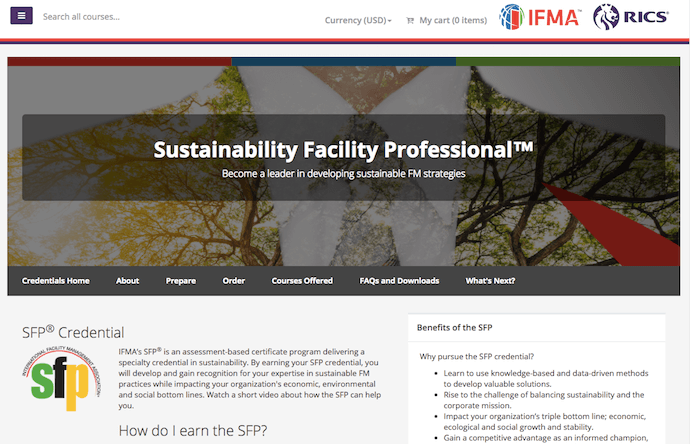
fm-training-landing-page

FM Training is a certification hub for facility managers (FMs), the same people who work to make their buildings facilities LEED-certified. Lots of coursework can go into earning this certification, but it can be a challenge to find curricula that caters to these professionals.

FM Training's AdWords campaign, above, makes sure FMs know they've come to the right place.

While the five blue links beneath the ad help users jump directly to the information they're most interested in, the first sentence of the meta-description is what really reaches out to this audience: "FMs ..." -- the audience is clearly stated in terms they'd understand -- "... see a salary increase of 6% or more within 1 yr." The ad uses the limited space it has to send a message designed to encourage clicks and make the ad worth the investment.

6. LeftLane Sports

Search term: hiking boots for women

leftlane-sports-adwords-campaignLinks to:

leftlane-sports-landing-page

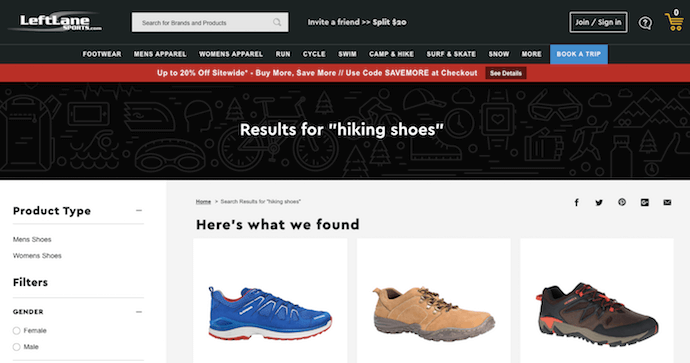
The campaign by LeftLane Sports, above, is an example of local business advertising done right. The company doesn't even need people to click on the link to make money from it.

If searchers in the Boston area search for "hiking boots for women," they won't just see a paid result by LeftLane Sports; they'll see where the brand's nearest storefront is and how long they're open. It's the perfect way to drive website traffic to the appropriate product pages and promote a local presence in the process.

How to Run a Successful Google Ads Campaign

1. Get an AdWords Account

Before you can do anything, you'll need to visit the AdWords site and sign up for an AdWords account. This involves some financial information so that Google can get paid for each click, so be ready with all your banking credentials.

Once you have an account and you're ready to go, click the Create Your First Campaign button.

2. Choose Campaign Type

Most would suggest starting with the "Search Network only" option, but you can change this as you learn and grow. Next, you'll want to give your campaign a name so you can track your results. It's a good idea to start with a naming system that you'll keep using so you don't get confused somewhere down the line.

3. Designate Geographic Area

Being an online shop does mean you're less concerned about geographic constraints. It's still not a bad idea to consider where, exactly, the majority of your audience lives. If you don't know, you may want to back up a step and consider your buyer personas first. Why spend money advertising to people in the Midwest if the bulk of your customers live in the Northeast?

You can also reach other countries if your ecommerce company serves international buyers. Just be sure you're prepared for any of the buyers who come your way as a result of your ads. You might pay a lot of money for visitors who can't make a purchase if you're not careful.

4. Set Your Budget

This is a pretty important step. You want to include enough money to make a difference, but you really don't want to break the bank. You can manually set the bids for clicks, which gives you more control. This also means your ads will stop showing once your budget is spent. That means you won't end up with a shocker of a bill later.

Once you've gotten the hang of everything, you can go back and change your settings to automatic or maybe even apply for a Google credit line. These are best left to experienced users, because it doesn't take much to completely empty a bank account just for paid clicks.

5. Write Your Ad

This is the most important aspect of your AdWords education. The copy you use is what will convince potential buyers to click. You want to attract plenty of people, yes, but you also want those people to buy. If they don't buy, you pay anyway. So start with a great headline that uses search terms that will reach your niche. You only get 90 characters, according to Google, so make every last one of them count. You might even need to use abbreviations, or you can search for shorter synonyms.

Then you get another 90 characters for the second and third lines. Use this space to point on benefits. How will the product solve your buyers' pain? Then on the third line you can capitalize on a feature. Be ready to change these if you notice your ad isn't gaining a lot of traction.

6. Add Your Display URL

It's important to notice the difference between the URLs you'll use in your ad. The display URL is the one you want people to remember. It's the home page to your website, the address people will type in if they visit without finding you through an ad first. This is what you want to display.

7. Add Your Destination URL

With a few exceptions -- one of which you'll see in the list of AdWords examples, above -- it's not a good idea to have a PPC ad that leads straight to your home page. You want a landing page that focuses on the products featured in the AdWords ad. If you send people straight to the home page, they'll have to do another search for the products they want, and they're not likely to stick around for that. This is why it's so important to understand the difference between the display URL and the destination URL.

8. Add Your Keywords

Keep in mind you'll be competing against many other companies for the same audience when bidding on keywords for which you want your ad to show up. Take some time to think of the keywords that will reach people who are ready to buy. For instance, instead of using "luxury shoes" in your PPC ad, you can use keywords such as "red leather heels." Maybe you'll miss out on people who are looking for shoes of all types, but you'll snag those who have a particular shoe in mind. They'll be more likely to make a purchase if your ad leads to a landing page with red leather heels, and that will more than pay for their click.

You can also use negative keywords and save a lot of money on your clicks. These tell AdWords what you don't want your ad to show up for. In other words, you can use keywords such as red leather heels not stilettos.

9. Bid On Your Clicks

Finally, you'll need to tell Google how much you want to spend on your clicks. Remember, you're bidding on visibility here. Those willing to pay more for clicks will show up more often in the searches. You really do have to spend money to make money, especially in the pay-per-click game. As long as you're manually controlling your budget, you can go all out for clicks until your cash runs out and just replenish your budget when you're ready to go again.

10. Double Check Your Double Check

It's always a good idea to check over everything one more time before you set your ad in motion. Is everything spelled correctly? You'll miss out on keyword searches if you typo one of them. Did you make sure to manually control the budget? You could end up broke tomorrow if you didn't. When you're sure you did everything correctly, then take a deep breath and launch.

Beyond setting everything up correctly, you'll also want to A/B test your results often. Change headlines, introduce new features, focus on different benefits -- and then take note of the number of conversions. There's always a way to make your ad perform better.
New Call-to-action


from Marketing https://blog.hubspot.com/marketing/build-the-best-google-adwords-campaign

Are More People Getting Their News Online Than on TV? The Answer May Surprise You

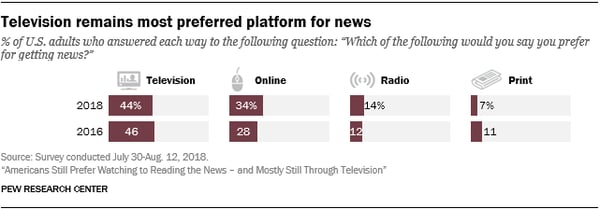
New data from the Pew Research Center says that U.S. consumers would rather watch the news -- not read or listen to it -- and would prefer to do so on TV, not online.

"Their viewing loyalties have yet to migrate fully to the web," the report says. "Just over four-in-ten U.S. adults (44%) prefer TV, compared with about a third (34%) who prefer the web."

PJ_2018.12.03_read-watch-listen_0-02Source: Pew Research Center

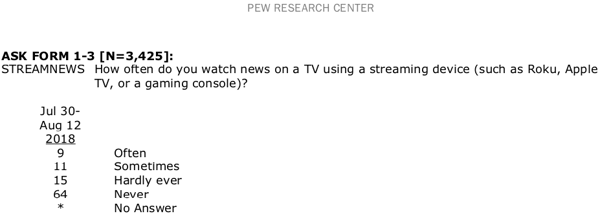
The "TV" preference accounts for news viewed on either local, network, or cable channels -- and seemingly does not include those who watch televised news on such channels through a streaming device or service (like Roku or Hulu).

Screen Shot 2018-12-03 at 2.31.06 PMSource: Pew Research Center

The report arrives in the midst of mixed reports about the health and trend of online news platforms and consumption habits. Following last week's news of massive layoffs at online media site Mic -- and how that potentially reflects the future of digital media -- some, like Washington Post columnist Margaret Sullivan, wonder if the online news "bubble has burst."

But things are not always as they appear on the surface. While this data may appear to correlate with the Mic news, it doesn't necessarily mean that the end of digital news consumption is near -- and it could, alternatively, signal that preferences will continue to dramatically change in a short period of time.

Here's a deeper look at the data, and what it could mean for the future of news consumption.

TV vs. Web

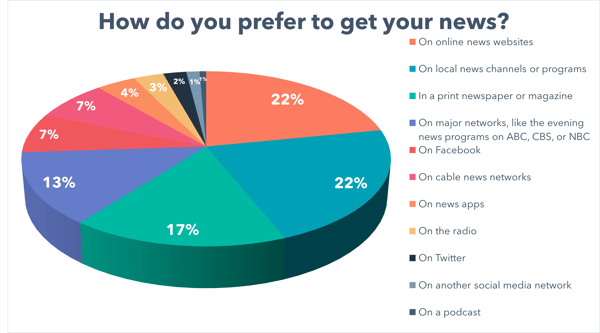
First, we wanted to see how news consumption preferences varied across different regions. Pew's research focused on American respondents, so we decided to survey news viewers (861 of them) across the U.S., UK, and Canada -- and ask them for their prefer method of consuming the news.

How do you prefer to get your news_US dictionData collected with Lucid

It's worth noting that different language was used for each region surveyed based on how television is provided in each country, and the language used to describe it.

What we might know as"major network" evening news programs in the U.S. are sometimes known as "supper-hour broadcasts" in Canada or "broadcast television" channels such as BBC or Channel 4 in the UK.

For "cable news networks," we used the terms "24-hour cable news networks" in Canada and "pay television channel news programmes, like Sky" in the UK.

Online_local newsData collected with Lucid

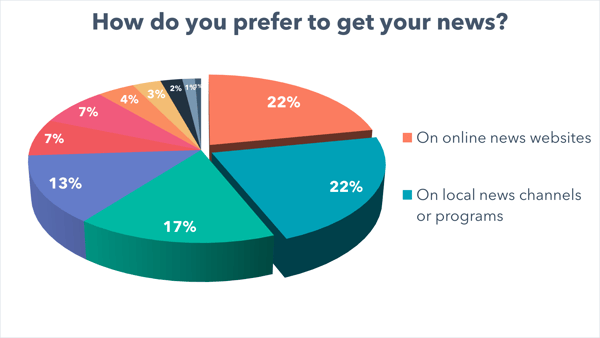
The first thing we noticed was that the highest number of respondents indicated that they prefer watching the news on online news websites. However, the same percentage of respondents said they prefer to consume news on local channels and program. Digital news media isn't over, it seems -- nor is local news.

The Gradual Shift in Preferences

What wasn't specified, however, was the specific nature of the online news sites preferred by consumers -- whether it was the online version of traditional newspapers like The New York Times, or an online-only news outlet. 

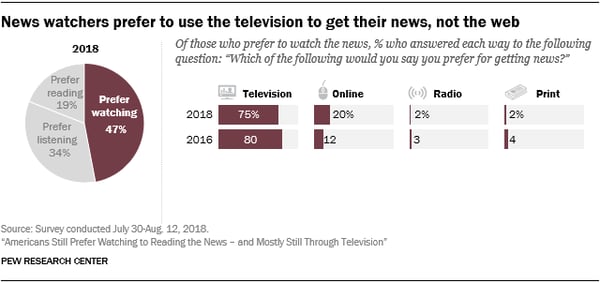
In any case, it points to a "closing of the gap" between the number of consumers who prefer to get their news from TV and those who do so online. Although the preference to watch news on TV continues to outpace that of online viewing, it's shrinking (slightly).

PJ_2018.12.03_read-watch-listen_0-04Source: Pew Research Center

As per the figure above, the number of people who want to watch news on television has dropped by 5% since 2016, while the number for those who want to do so online has increased by 8%.

PJ_2018.12.03_read-watch-listen_0-03Source: Pew Research Center

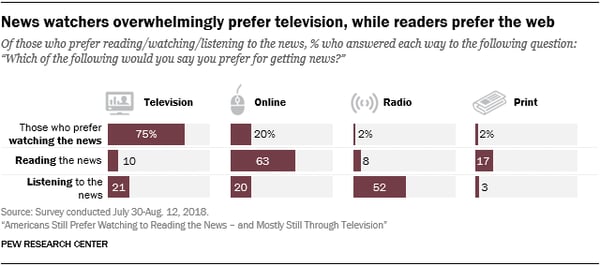
Furthermore, not everyone prefers watching the news, and according to the Pew study those who prefer to read it would rather do so online.

Looking Ahead

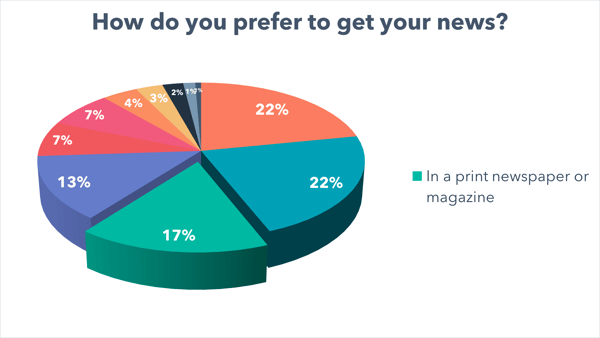
What was particularly interesting to us was the number of respondents who indicated that they prefer to read the news via print publications. 

Print newsData collected with Lucid

While 17% may appear to be a fairly small portion of participants, it is interesting to note that it was the third-highest response -- and outnumbered the total of those who said they prefer to get their news on social media.

There are a few things that could account for these figures.

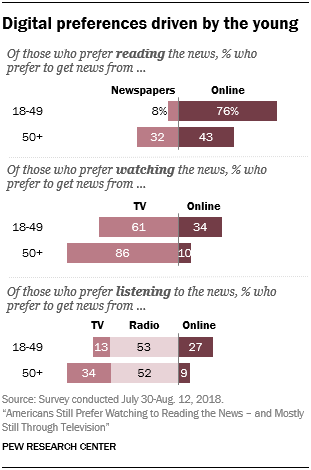
First, there are age demographics to take into account. The Pew report, for instance, found that while most consumers between 18-49 still prefer to watch news on TV -- more than two-thirds of those from that age group prefer to get their news online than those who are over 50.

PJ_2018.12.03_read-watch-listen_0-05Source: Pew Research Center

As sources of news and those who watch it continue to evolve and age, then, it could signal a further closing of the gap between TV and online consumption preferences.

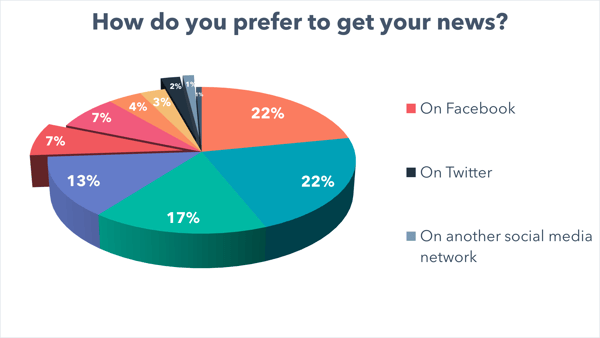
Second, our findings (which somewhat align with those in the Pew report) could indicate what's ahead for the likes of Facebook as a source of news -- which only 7% of respondents said is there preferred method of getting this information. 

social media newsData collected with Lucid

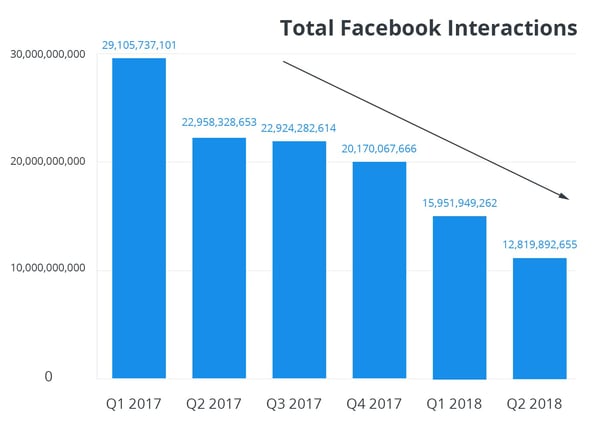
Over the course of 2018 -- since Facebook announced in January that it would overhaul its News Feed algorithm to prioritize content from friends and family over those from pages -- many businesses and outlets have observed a dropped in engagement.

Business Pages, for instance, had seen a 50% drop in engagement by August, and many news outlets struggled with Facebook's new rules for promoted posts so much, they gave up on publishing ads to the site altogether. 

Total-Facebook-Interactions

Source: Buffer

"I think there's a mix of lost trust, changing usage habits, and the level or cadence of news being so high," says HubSpot VP of Marketing Jon Dick, "that people are looking for more curation on what matters."

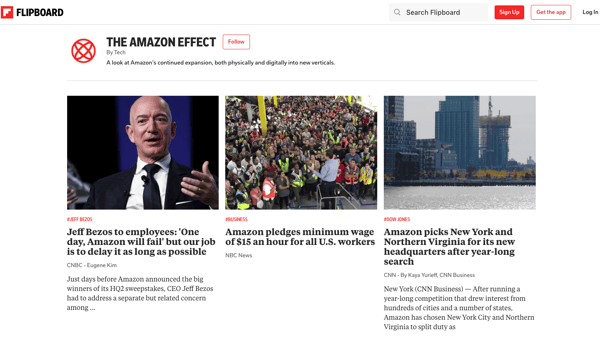
Combined with a growing preference for online news consumption, the mix alluded to by Dick could point to a future where news consumers begin to lean more heavily into specialized aggregation sites -- like Flipboard, for example, where editorial and subject matter experts regularly curate news items across the web according to different areas of existence.

Screen Shot 2018-12-03 at 4.22.28 PM

Stay tuned for what's to come in 2019.


from Marketing https://blog.hubspot.com/marketing/where-people-get-their-news

7 Search Ranking Factors Analyzed: A Follow-Up Study

Posted by Jeff_Baker

Grab yourself a cup of coffee (or two) and buckle up, because we’re doing maths today.

Again.

Back it on up...

A quick refresher from last time: I pulled data from 50 keyword-targeted articles written on Brafton’s blog between January and June of 2018.

We used a technique of writing these articles published earlier on Moz that generates some seriously awesome results (we’re talking more than doubling our organic traffic in the last six months, but we will get to that in another publication).

We pulled this data again… Only I updated and reran all the data manually, doubling the dataset. No APIs. My brain is Swiss cheese.

We wanted to see how newly written, original content performs over time, and which factors may have impacted that performance.

Why do this the hard way, dude?

“Why not just pull hundreds (or thousands!) of data points from search results to broaden your dataset?”, you might be thinking. It’s been done successfully quite a few times!

Trust me, I was thinking the same thing while weeping tears into my keyboard.

The answer was simple: I wanted to do something different from the massive aggregate studies. I wanted a level of control over as many potentially influential variables as possible.

By using our own data, the study benefited from:

  • The same root Domain Authority across all content.
  • Similar individual URL link profiles (some laughs on that later).
  • Known original publish dates and without reoptimization efforts or tinkering.
  • Known original keyword targets for each blog (rather than guessing).
  • Known and consistent content depth/quality scores (MarketMuse).
  • Similar content writing techniques for targeting specific keywords for each blog.

You will never eliminate the possibility of misinterpreting correlation as causation. But controlling some of the variables can help.

As Rand once said in a Whiteboard Friday, “Correlation does not imply causation (but it sure is a hint).

Caveat:

What we gained in control, we lost in sample size. A sample size of 96 is much less useful than ten thousand, or a hundred thousand. So look at the data carefully and use discretion when considering the ranking factors you find most likely to be true.

This resource can help gauge the confidence you should put into each Pearson Correlation value. Generally, the stronger the relationship, the smaller sample size needed to be be confident in the results.

So what exactly have you done here?

We have generated hints at what may influence the organic performance of newly created content. No more, and no less. But they are indeed interesting hints and maybe worth further discussion or research.

What have you not done?

We have not published sweeping generalizations about Google’s algorithm. This post should not be read as a definitive guide to Google’s algorithm, nor should you assume that your site will demonstrate the same correlations.

So what should I do with this data?

The best way to read this article, is to observe the potential correlations we observed with our data and consider the possibility of how those correlations may or may not apply to your content and strategy.

I’m hoping that this study takes a new approach to studying individual URLs and stimulates constructive debate and conversation.

Your constructive criticism is welcome, and hopefully pushes these conversations forward!

The stat sheet

So quit jabbering and show me the goods, you say? Alright, let’s start with our stats sheet, formatted like a baseball card, because why not?:

*Note: Only blogs with complete ranking data were used in the study. We threw out blogs with missing data rather than adding arbitrary numbers.

And as always, here is the original data set if you care to reproduce my results.

So now the part you have been waiting for...

The analysis

To start, please use a refresher on the Pearson Correlation Coefficient from my last blog post, or Rand’s.

1. Time and performance

I started with a question: “Do blogs age like a Macallan 18 served up neat on a warm summer Friday afternoon, or like tepid milk on a hot summer Tuesday?

Does the time indexed play a role in how a piece of content performs?

Correlation 1: Time and target keyword position

First we will map the target keyword ranking positions against the number of days its corresponding blog has been indexed. Visually, if there is any correlation we will see some sort of negative or positive linear relationship.

There is a clear negative relationship between the two variables, which means the two variables may be related. But we need to go beyond visuals and use the PCC.

Days live vs. target keyword position

PCC

-.343

Relationship

Moderate

The data shows a moderate relationship between how long a blog has been indexed and the positional ranking of the target keyword.

But before getting carried away, we shouldn’t solely trust one statistical method and call it a day. Let’s take a look at things another way: Let’s compare the average age of articles whose target keywords rank in the top ten against the average age of articles whose target keywords rank outside the top ten.

Average age of articles based on position

Target KW position ≤ 10

144.8 days

Target KW position > 10

84.1 days

Now a story is starting to become clear: Our newly written content takes a significant amount of time to fully mature.

But for the sake of exhausting this hint, let’s look at the data one final way. We will group the data into buckets of target keyword positions, and days indexed, then apply them to a heatmap.

This should show us a clear visual clustering of how articles perform over time.

This chart, quite literally, paints a picture. According to the data, we shouldn’t expect a new article to realize its full potential until at least 100 days, and likely longer. As a blog post ages, it appears to gain more favorable target keyword positioning.

Correlation 2: Time and total ranking keywords on URL

You’ll find that when you write an article it will (hopefully) rank for the keyword you target. But often times it will also rank for other keywords. Some of these are variants of the target keyword, some are tangentially related, and some are purely random noise.

Instinct will tell you that you want your articles to rank for as many keywords as possible (ideally variants and tangentially related keywords).

Predictably, we have found that the relationship between the number of keywords an article ranks for and its estimated monthly organic traffic (per SEMrush) is strong (.447).

We want all of our articles to do things like this:

We want lots of variants each with significant search volume. But, does an article increase the total number of keywords it ranks for over time? Let’s take a look.

Visually this graph looks a little murky due to the existence of two clear outliers on the far right. We will first run the analysis with the outliers, and again without. With the outliers, we observe the following:

Days live vs. total keywords ranking on URL (w/outliers)

PCC

.281

Relationship

Weak/borderline moderate

There appears to be a relationship between the two variables, but it isn’t as strong. Let’s see what happens when we remove those two outliers:

Visually, the relationship looks stronger. Let’s look at the PCC:

Days live vs. total keywords ranking on URL (without outliers)

PCC

.390

Relationship

Moderate/borderline strong

The relationship appears to be much stronger with the two outliers removed.

But again, let’s look at things another way.

Let’s look at the average age of the top 25% of articles and compare them to the average age of the bottom 25% of articles:

Average age of top 25% of articles versus bottom 25%

Top 25%

148.9 days

Bottom 25%

73.8 days

This is exactly why we look at data multiple ways! The top 25% of blog posts with the most ranking keywords have been indexed an average of 149 days, while the bottom 25% have been indexed 74 days — roughly half.

To be fully sure, let’s again cluster the data into a heatmap to observe where performance falls on the time continuum:

We see a very similar pattern as in our previous analysis: a clustering of top-performing blogs starting at around 100 days.

Time and performance assumptions

You still with me? Good, because we are saying something BIG here. In our observation, it takes between 3 and 5 months for new content to perform in organic search. Or at the very least, mature.

To look at this one final way, I’ve created a scatterplot of only the top 25% of highest performing blogs and compared them to their time indexed:

There are 48 data plots on this chart, the blue plots represent the top 25% of articles in terms of strongest target keyword ranking position. The orange plots represent the top 25% of articles with the highest number of keyword rankings on their URL. (These can be, and some are, the same URL.)

Looking at the data a little more closely, we see the following:

90% of the top 25% of highest-performing content took at least 100 days to mature, and only two articles took less than 75 days.

Time and performance conclusion

For those of you just starting a content marketing program, remember that you may not see the full organic potential for your first piece of content until month 3 at the earliest. And, it takes at least a couple months of content production to make a true impact, so you really should wait a minimum of 6 months to look for any sort of results.

In conclusion, we expect new content to take at least 100 days to fully mature.

2. Links

But wait, some of you may be saying. What about links, buddy? Articles build links over time, too!

It stands to reason that, over time, a blog will gain links (and ranking potential) over time. Links matter, and higher positioned rankings gain links at a faster rate. Thus, we are at risk of misinterpreting correlation for causation if we don’t look at this carefully.

But what none of you know, that I know, is that being the terrible SEO that I am, I had no linking strategy with this campaign.

And I mean zero strategy. The average article generated 1.3 links from .5 linking domains.

Nice.

Linking domains vs. target keyword position

PCC

-.022

Relationship

None

Average linking domains to top 25% of articles

.46

Average linking domains to bottom 25% of articles

.46

The one thing consistent across all the articles was a shocking and embarrassing lack of inbound links. This is demonstrated by an insignificant correlation coefficient of -.022. The same goes for the total number of links per URL, with a correlation coefficient of -.029.

These articles appear to have performed primarily on their content rather than inbound links.

(And they certainly would have performed much better with a strong, or any, linking strategy. Nobody is arguing the value of links here.) But mostly...

Shame on me.

Shame. Shame. Shame.

But on a positive note, we were able to generate a more controlled experiment on the effects of time and blog performance. So, don’t fire me just yet?

Note: It would be interesting to pull link quality metrics into the discussion (for the precious few links we did earn) rather than total volume. However, after a cursory look at the data, nothing stood out as being significant.

3. Word count

Content marketers and SEOs love talking about word count. And for good reason. When we collectively agreed that “quality content” was the key to rankings, it would stand to reason that longer content would be more comprehensive, and thus do a better job of satisfying searcher intent. So let’s test that theory.

Correlation 1: Target keyword position versus total word count

Will longer articles increase the likelihood of ranking for the keyword you are targeting?

Not in our case. To be sure, let’s run a similar analysis as before.

Word count vs. target keyword position

PCC

.111

Relationship

Negligible

Average word count of top 25% articles

1,774

Average word count of bottom 25% articles

1,919

The data shows no impact on rankings based on the length of our articles.

Correlation 2: Total keywords ranking on URL versus word count

One would think that longer content would result in is additional ranking keywords, right? Even by accident, you would think that the more related topics you discuss in an article, the more keywords you will rank for. Let’s see if that’s true:

Total keywords ranking on URL vs. word count

PCC

-.074

Relationship

None

Not in this case.

Word count, speculative tangent

So how can it be that so many studies demonstrate higher word counts result in more favorable rankings? Some reconciliation is in order, so allow me to speculate on what I think may be happening in these studies.

  1. Most likely: Measurement techniques. These studies generally look at one factor relative to rankings: average absolute word count based on position. (And, there actually isn’t much of a difference in average word count between position one and ten.)As we are demonstrating in this article, there may be many other factors at play that need to be isolated and tested for correlations in order to get the full picture, such as: time indexed, on-page SEO (to be discussed later), Domain Authority, link profile, and depth/quality of content (also to be discussed later with MarketMuse as a measure). It’s possible that correlation does not imply correlation, and by using word count averages as the single method of measure, we may be painting too broad of a stroke.
  2. Likely: High quality content is longer, by nature. We know that “quality content” is discussed in terms of how well a piece satisfies the intent of the reader. In an ideal scenario, you will create content that fully satisfies everything a searcher would want to know about a given topic. Ideally you own the resource center for the topic, and the searcher does not need to revisit SERPs and weave together answers from multiple sources. By nature, this type of comprehensive content is quite lengthy. Long-form content is arguably a byproduct of creating for quality. Cyrus Shepard does a better job of explaining this likelihood here.
  3. Less likely: Long-form threshold. The articles we wrote for this study ranged from just under 1,000 words to nearly as high as 4,000 words. One could consider all of these as “long-form content,” and perhaps Google does as well. Perhaps there is a word count threshold that Google uses.

This is all speculation. What we can say for certain is that all our content is 900 words and up, and shows no incremental benefit to be had from additional length.

Feel free to disagree with any (or all) of my speculations on my interpretation of the discrepancies of results, but I tend to have the same opinion as Brian Dean with the information available.

4. MarketMuse

At this point, most of you are familiar with MarketMuse. They have created a number of AI-powered tools that help with content planning and optimization.

We use the Content Optimizer tool, which evaluates the top 20 results for any keyword and generates an outline of all the major topics being discussed in SERPs. This helps you create content that is more comprehensive than your competitors, which can lead to better performance in search.

Based on the competitive landscape, the tool will generate a recommended content score (their proprietary algorithm) that you should hit in order to compete with the competing pages ranking in SERPs.

But… if you’re a competitive fellow, what happens if you want to blow the recommended score out of the water? Do higher scores have an impact on rankings? Does it make a difference if your competition has a very low average score?

We pulled every article’s content score, along with MarketMuse’s recommended scores and the average competitor scores, to answer these questions.

Correlation 1: Overall MarketMuse content score

Does a higher overall content score result in better rankings? Let’s take a look:

Absolute MarketMuse score vs. target keyword position

PCC

.000

Relationship

None

A perfect zero! We weren’t able to beat the system by racking up points. I also checked to see if a higher absolute score would result in a larger number of keywords ranking on the URL — it doesn’t.

Correlation 2: Beating the recommended score

As mentioned, based on the competitive landscape, MarketMuse will generate a recommended content score. What happens if you blow the recommended score out of the water? Do you get bonus points?

In order to calculate this correlation, we pulled the content score percentage attainment and compared it to the target keyword position. For example, if we scored a 30 of recommended 25, we hit 120% attainment. Let’s see if it matters:

Percentage content score attainment vs. target keyword position

PCC

.028

Relationship

None

No bonus points for doing extra credit!

Correlation 3: Beating the average competitors’ scores

Okay, if you beat MarketMuse’s recommendations, you don’t get any added benefit, but what if you completely destroy your competitors’ average content scores?

We will calculate this correlation the same way we previously did, with percentage attainment over the average competitor. For example, if we scored a 30 over the average of 10, we hit 300% attainment. Let’s see if that matters:

Percentage attainment over average competitor score versus target KW position

PCC

-.043

Relationship

None

That didn’t work either! Seems that there are no hacks or shortcuts here.

MarketMuse summary

We know that MarketMuse works, but it seems that there are no additional tricks to this tool.

If you regularly hit the recommended score as we did (average 110% attainment, with 81% of blogs hitting 100% attainment or better) and cover the topics prescribed, you should do well. But don’t fixate on competitor scores or blowing the recommended score out of the water. You may just be wasting your time.

Note: It’s worth noting that we probably would have shown stronger correlations had we intentionally bombed a few MarketMuse scores. Perhaps a test for another day.

5. On-page optimization

Ah, old-school technical SEO. This type of work warms the cockles of a seasoned SEO’s heart. But does it still have a place in our constantly evolving world? Has Google advanced to the point where it doesn’t need technical cues from SEOs to understand what a page is about?

To find out, I have pulled Moz’s on-page optimization score for every article and compared them to the target keywords’ positional rankings:

Let’s take a look at the scatterplot for all the keyword targets.

Now looking at the math:

On-page optimization score vs. target keyword position

PCC

-.384

Relationship

Moderate/strong

Average on-page score for top 25%

91%

Average on-page score for bottom 25%

87%

If you have a keen eye you may have noticed a few strong outliers on the scatterplot. If we remove three of the largest outliers, the correlation goes up to -.435, a strong relationship.

Before we jump to conclusions, let’s look at this data one final way.

Let’s take a look at the percentage of articles with their target keywords ranking 1–10 that also have a 90% on-page score or better. We will compare that number to the percentage of articles ranking outside the top ten that also have a 90% on-page score or better.

If our assumption is correct, we will see a much higher percentage of keywords ranking 1–10 with an on-page score of 90% or better, and a lower number for articles ranking greater than 10.

On-page optimization score by rankings

Percentage of KWs ranking 1–10 with ≥ 90% score

73.5%

Percentage of keywords ranking >10 with ≥ 90% score

53.2%

This is enough of a hint for me. I’m implementing a 90% minimum on-page score from here on out.

Old school SEOs, rejoice!

6. The competition’s average word count

We won’t put this “word count” argument to bed just yet...

Let’s ask ourselves, “Does it matter how long the average content of the top 20 results is?”

Is there a relationship between the length of your content versus the average competitor?

What if your competitors are writing very short form, and you want to beat them with long-form content?

We will measure this the same way as before, with percentage attainment. For example, if the average word count of the top 20 results for “content marketing agency” is 300, and our piece is 450 words, we hit 150% attainment.

Let’s see if you can “out-verbose” your opponents.

Percentage word count attainment versus target KW position

PCC

.062

Relationship

None

Alright, I’ll put word count to bed now, I promise.

7. Keyword density

You’ve made it to the last analysis. Congratulations! How many cups of coffee have you consumed? No judgment; this report was responsible for entire coffee farms being completely decimated by yours truly.

For selfish reasons, I couldn’t resist the temptation to dispel this ancient tactic of “using target keywords” in blog content. You know what I’m talking about: when someone says “This blog doesn’t FEEL optimized... did you use the target keyword enough?”

There are still far too many people that believe that littering target keywords throughout a piece of content will yield results. And misguided SEO agencies, along with certain SEO tools, perpetuate this belief.

Yoast has a tool in WordPress that some digital marketers live and die by. They don’t think that a blog is complete until Yoast shows the magical green light, indicating that the content has satisfied the majority of its SEO recommendations:

Uh oh, keyword density is too low! Let’s see if it that ACTUALLY matters.

Not looking so good, my keyword-stuffing friends! Let’s take a look at the PCC:

Target keyword ranking position vs. Yoast keyword density

PCC

.097

Relationship

None/Negligible

Believers would like to see a negative relationship here; as the keyword density goes down, the ranking position decreases, producing a downward sloping line.

What we are looking at is a slightly upward-sloping line, which would indicate losing rankings by keyword stuffing — but fortunately not TOO upward sloping, given the low correlation value.

Okay, so PLEASE let that be the end of “keyword density.” This practice has been disproven in past studies, as referenced by Zyppy. Let’s confidently put this to bed, forever. Please.

Oh, and just for kicks, the Flesch Reading Ease score has no bearing on rankings either (-.03 correlation). Write to a third grade level, or a college level, it doesn’t matter.

TL;DR (I don’t blame you)

What we learned from our data

  1. Time: It took 100 days or more for an article to fully mature and show its true potential. A content marketing program probably shouldn’t be fully scrutinized until month 5 or 6 at the very earliest.
  2. Links: Links matter, I’m just terrible at generating them. Shame.
  3. Word count: It’s not about the length of the content, in absolute terms or relative to the competition. It’s about what is written and how resourceful it is.
  4. MarketMuse: We have proven that MarketMuse works as it prescribes, but there is no added benefit to breaking records.
  5. On-page SEO: Our data demonstrates that it still matters. We all still have a job.
  6. Competitor content length: We weren’t successful at blowing our competitors out of the water with longer content.
  7. Keyword density: Just stop. Join us in modern times. The water is warm.

In conclusion, some reasonable guidance we agree on is:

Wait at least 100 days to evaluate the performance of your content marketing program, write comprehensive content, and make sure your on-page SEO score is 90%+.

Oh, and build links. Unlike me. Shame.

Now go take a nap.


Sign up for The Moz Top 10, a semimonthly mailer updating you on the top ten hottest pieces of SEO news, tips, and rad links uncovered by the Moz team. Think of it as your exclusive digest of stuff you don't have time to hunt down but want to read!


from The Moz Blog http://tracking.feedpress.it/link/9375/10867946

How to buy an essay

If you need some help with your writing assignments, then you’ve probably considered how to buy essay. The process of buying an essay is fairly straightforward but it does take some time.

If you’ve never done this before, then you’ll want to sign up early so you have enough time to meet your essay deadlines.

This is how you go about buying an essay.

1. Complete an Order Form

When you’re asking a writer to complete an assignment, you need to provide information about the essay. This order form will ask you information about the length and subject of the essay. You can also provide information about the theme, any citation or formatting information, and other pertinent information. Keep in mind that the more information provided, the better. Always explain the essay requirements as well as possible. You’ll end up with better work that way.

2. Create a Profile with Payment

You’ll have to create a profile and fill out payment information before you can receive your essay. Rates for papers can vary depending on your needs but make sure that you fill out this information correctly.

3. Track Your Progress

You will be assigned a writer for your paper. As the writer works on the essay, you’ll receive information about how the paper is going. You can also use this time to provide any additional information to the writer as needed. The writer may also contact you with any questions about the essay. The writing process can be fairly short if your deadline is quick, so you’ll want to make sure you’re available if needed.

4. Review the Essay

After the essay is completed, the writer will send it to you for review. You’ll be able to read through the essay and provide any feedback to the writer. If you notice any mistakes in the essay, you can contact the writer for any revisions. While this doesn’t happen very often, it’s important that you review the essay before completing the process. Once you’ve downloaded the article, you won’t be able to ask the writer for changes so read thoroughly before accepting.

5. Accept and Download the Essay

This final step of the process is the simplest. You’ll accept the article when it’s completed and your payment will be processed.

You’ll already have agreed to the price of the article when you complete the order form so the payment will proceed. You’ll be able to download the article and save or print it as needed.

Make sure that you can open the file and that the formatting is correct when you download it. Now your article is available to be submitted as needed.

Most people find that going through the process of using an essay writing service is simple and easy to follow. The only thing needed to be successful is that you provide good information when filling out an essay order form. As the writer needs as much detail as possible, you’ll end up with a better article by using a service and being thorough throughout the process.

The post How to buy an essay appeared first on TheMarketingblog.


from TheMarketingblog http://www.themarketingblog.co.uk/2018/12/how-to-buy-an-essay/

The Beginner's Guide to Design Patterns

To fully understand the importance of design patterns, let's start with an example -- when a user uses your product, how do they save their landing page, blog post, template, etc.? Do their projects auto-save, or do they need to press a "Save" button?

Let's say you choose auto-save. Great. Now, how much time do you have? Do you want to go into each individual page and code for the auto-save component, with a big potential for error?

Or do you want to use a design pattern to ensure each of your website pages saves the same way, without tedious effort on your part?

That's the value of design patterns.

Here, we'll explain what design patterns are, and provide lists of design patterns in Java, C# and .Net, so you can save valuable time and effort on your next design project.

Design patterns explained simply

At its most basic, design patterns are solutions to recurring problems.

In the UX world, then, a design pattern is a pre-prescribed solution to a common design problem. Essentially, it's a way of saying, "Here's how we typically solve for this problem, if you want to use our method."

Chelsea Bathurst, a Design Lead at HubSpot, puts it this way: "Basically, components are the foundation -- how does this thing look. Design patterns are how they work together."

Design patterns are undeniably useful. They allow designers to avoid "re-inventing the wheel", and because they are tried-and-true solutions from experienced designers, they are less risky than creating something from scratch.

There are three types of design patterns: 

  • Creational design patterns: Regarding object creation mechanisms
  • Structural design patterns: Regarding Class and Object composition -- identifying relationships and patterns between components
  • Behavioral design patterns: Identifying communication patterns between Class objects

Next, let's take a look at our lists of design patterns in java, or C# and .NET, so you can begin applying them yourself. 

Once you understand the uses of each of these design patterns, you can choose which ones will best fit your needs. However, it's critical you understand basic java, or C# and .NET programming concepts, to correctly apply these solutions. If you don't, begin by taking an introductory course before taking any next steps with these design patterns.


from Marketing https://blog.hubspot.com/marketing/design-patterns

5 Popular Job Boards That Will Help You Hire The Most Qualified Candidates

As a recruiter, your job isn’t just limited to finding qualified candidates to fill your company’s new roles. You also have to promote these roles and convince the best applicants to join your company. In other words, you’re not just a recruiter -- you’re also a marketer and a sales person.

As a marketer of your employer’s mission and culture, you need to think like a content strategist, especially during the digital age. But instead of posting content on social media and search engines to attract the best fit customers for your company, you need to post compelling ads on job boards to persuade the most competent candidates to apply for your open roles.

But how do you do know which job boards will pull in the most accomplished applicants? To help you spend your time and recruiting budget wisely, we’ve compiled a list of the best job boards that will help you attract the most qualified candidates.

1. Glassdoor

As one of the most popular job boards out there, Glassdoor has over 62 million job seekers visit its website each month, giving you access to one of the largest and most diverse pool of applicants.

Glassdoor is usually the go-to resource for people to find jobs, so you’ll probably source the highest quantity and quality of applicants from the platform, which will help you hire more qualified candidates faster. According to Glassdoor’s own data, their candidates are also two times more likely to get hired and have a 30% higher retention rate than candidates on other job boards.

If you want to try out Glassdoor before you buy their premium version, they offer a free trial that lets you post up to 10 jobs and gives you job description templates. When you’re ready to pay for their premium package, the paid version lets you update and brand your company’s profile, provides robust analytics, like profile traffic, candidate demographics, and competitive intelligence, and offers sponsored job ads, which get 13 times more clicks than normal job postings.

2. LinkedIn Jobs

With a network of over 500 million professionals and nine million companies, LinkedIn naturally lends itself to connecting job seekers with employers. In fact, a hire is made on LinkedIn every 10 seconds and 90% of their users are interested in hearing about new job opportunities.

As a social media site for the working world, LinkedIn lets you search for candidates with their advanced filtering options and message them through InMail. If you recruit using LinkedIn Jobs, you’ll have access to a candidate recommendations feed and a candidate management dashboard, where you can track your candidates from application to hire.

LinkedIn also offers sponsored ad distribution through email and LinkedIn. You’ll only pay LinkedIn when people click on your job ad, so you’re paying for results, not impressions.

3. Indeed

200 million people visit Indeed’s website each month, which gives you access to the largest pool of job seekers out of all the job boards on this list.

To attract qualified candidates on Indeed, you can customize your company page to showcase your culture and pay for sponsored job ads, which get up to five times more clicks than normal job postings.

If you want to reach out to job seekers first, you can sift through over 120 million resumes in their resume database.

4. Handshake

If you offer internships and entry level jobs, Handshake is one of the best job boards for hiring exceptional college students and recent graduates. Over 14 million students and young alumni from more than 700 colleges and universities create profiles on Handshake to find internships or their first job. And along with more than 300,000 companies, every Fortune 500 Companies uses Handshake to hire their next class of interns and entry-level employees.

Handshake has such a large network of job seekers because the schools they partner with usually commit to only using one platform to help their students and young alumni find jobs, and they’ve all decided to trust Handshake with this endeavor.

To help you pinpoint your best-fit candidates out of their large pool of potential hires, Handshake lets you narrow down candidates with advanced filtering options, message students directly on the platform, and schedule on-campus interviews, informational sessions, and chats at career fairs.

5. Google Job Search

Millions of job seekers search for open roles on Google every day. But instead of making people click through to a job board and browse through openings, Google offers a service where you can post your jobs directly on their search engine.

All you have to do is integrate your website with Google Job Search or connect the job board you post open roles on to the search engine. Removing this extra step from your application process spreads awareness for more of your open roles and increases the likelihood that you’ll attract higher quality applicants.

Choosing the right job board is crucial for faster and better hiring.

There are hundreds of job boards on the internet, but not all of them are created equal. Fortunately, most job seekers trust and have found rewarding roles on these five popular job boards, giving you a deep pool of talent to recruit and hire from.


from Marketing https://blog.hubspot.com/marketing/job-boards-sites

Sunday, 2 December 2018

4 common video formats that marketers need to know

As a marketer you don’t need to be familiar with all the many video formats out there – but you should be aware of the more popular options. That is because you will probably need to distribute videos in various ways, and knowing more about the more common video formats and when they should be used could make it easier.

Although the video formats that are frequently used do change from time to time, as of right now the 4 common video formats marketers need to know are:

• MP4 with H.264 for compatibility
Over the years MP4 with H.264 has become the ‘default’ video format for most purposes, and is certainly the most widely-used right now. It is supported by most devices and platforms, which is why it is so frequently used.

On top of that support, MP4 with H.264 is normally the preferred format for online platforms. For example you can see that in YouTube’s guidelines for video uploads.

• HEVC (H.265) for compression
The HEVC codec was meant to be the successor to H.264, but its adoption has been slow and it has taken a while for it to be supported. Although nowadays more devices and platforms support HEVC, there are many that still do not.

The reason it helps to know about HEVC is the simple fact that it can compress videos more efficiently than its predecessor, reducing the file size by up to 50%. As such if you’re distributing videos to a specific person (or group) that have devices with HEVC support, there are benefits to using it.

• MPEG-2 for DVD video
While the MPEG-2 format is definitely dated, it remains relevant to this day due to the fact that it is the format for DVD video. Simply put most DVD players can only play DVD videos that are encoded in MPEG-2, so if you’re ever burning a video DVD you will need to use it.

• AV1 for the future
Technically AV1 isn’t a ‘common’ format quite yet, but it is heading in that direction. It is a new format that was recently released by the AOMedia consortium and is designed to supplant H.264 and H.265.

The rollout of AV1 has been proceeding at a steady pace and many AOMedia members have already started to support or test the format. Considering the AOMedia consortium includes tech giants such as Amazon, Apple, Microsoft, Google, Netflix, and many others – it seems only a matter of time till AV1 becomes the most widely-used format on the internet.

Aside from knowing about the formats listed above, as a marketer you should also have a tool that you can use to convert the formats of your videos if need be. For example you could use Movavi Video Converter to convert MKV to MP4, AVI, or any other formats.

Keep in mind that even the formats listed above are subject to change, and some may very well be supplanted by others and fade into the background. For now they remain extremely relevant however – and knowing them could help you identify the best option to use.

The post 4 common video formats that marketers need to know appeared first on TheMarketingblog.


from TheMarketingblog http://www.themarketingblog.co.uk/2018/12/4-common-video-formats-that-marketers-need-to-know/